
Zero Width Space: What It Is and How to Remove It
Zero width space explained: what it is, why it breaks copied text, and how to detect and remove U+200B without breaking real formatting.

A zero width space is Unicode U+200B, and it takes up three bytes in UTF-8 while showing no visible width. That's why your copy-paste looks fine on screen but breaks search, matching, or layout.
You usually find it after copying from a website, a CMS, or an AI tool. The text looks normal, then one field won't match, one URL won't validate, or one column shifts for no obvious reason. If you need a fast way to search a document for the bad spot, the guide to document search shortcuts is a useful companion, because invisible characters are easier to catch when you can move through text quickly.

Table of Contents
- The Invisible Character That Breaks Your Copy-Paste
- What a Format Character Is
- How Zero Width Spaces Wreck Real Workflows
- Why Blanket Removal Is the Wrong Default
- A Practical Detection Toolkit
- Removing Zero Width Spaces Without Regrets
- When to Keep the Character and When to Strip It
The Invisible Character That Breaks Your Copy-Paste
The bug shows up in the dullest places. You paste a product name into a search field, and it will not match the same text already in your spreadsheet. A URL looks clean in your editor, then the link checker treats it as a different string. That is the zero width space problem in one line, an invisible character with a real code point and real consequences.
Here is the clean definition. Zero width space is U+200B, a Unicode character with zero visible width, but it still exists in the text stream and takes three bytes in UTF-8 (Wikipedia). Software can see it even when you cannot. It is not a typo, it is not a rendering glitch, and it is not harmless just because your eyes skip over it.
A stray ZWSP in copied text is routine cleanup. Strip it and move on. The dangerous case is different, and section 4 explains why invisible Unicode is now a security review surface, not just clutter.
Practical rule: if the text is ordinary Latin prose, a CSV export, or a pasted slug, just remove the stray character. If it is a configuration file, URL, or agent prompt, inspect first. If you need a fast way to find the bad spot, the guide to document search shortcuts helps.
What a Format Character Is
U+200B is not ordinary whitespace. It is a Unicode format character, so common trim and split logic often leaves it behind. Unicode reclassified it from Zs to Cf in 2003, which draws a clear line between a formatting control and a conventional space (Unicode PDF). That is why two strings can look identical and still fail exact matching.
Why it behaves differently from spaces
The Unicode Line Breaking Algorithm treats it as a break opportunity after the character, not before it (Unicode TR14). That matters in scripts such as Thai, Myanmar, Khmer, and Japanese, where invisible boundaries help text wrap correctly. Remove it blindly there, and you make the text worse, not cleaner.
| Code point | Name | Primary effect | Safe to remove in Latin prose |
|---|---|---|---|
| U+200B | Zero Width Space | Optional line-break opportunity | Usually yes |
| U+2060 | Word Joiner | Suppresses breaks | Sometimes, but not by default |
| U+00A0 | No-Break Space | Visible space that prevents breaks | No |
Bottom line: “zero width” describes how it looks, not whether it affects spacing.
How Zero Width Spaces Wreck Real Workflows
The failures are annoying because they look random. A word count is off by one in one editor and not another. A database join misses one row because the keys are visually identical but not byte-identical. A find-and-replace misses every third occurrence because the target text has an invisible break in the middle. This is the kind of bug that makes people blame Excel, browsers, or the database when the underlying problem is hidden Unicode.
Where the mismatch comes from
Code points and bytes are not the same thing. A filter that strips ASCII spaces, tabs, and line feeds won't catch U+200B, because it isn't one of those characters. HTML makes it worse, because the same character can arrive as ​ or ​ and slip through a sanitizer that only looks for raw Unicode after rendering (codepoints.net).
A few common failure modes show up again and again:
- Search misses: the visible text matches, but the hidden code point breaks the comparison.
- Duplicate detection fails: two rows look the same, but one contains an invisible character.
- CSV validation breaks: headers look right in a preview, then fail when the parser compares exact text.
- URL checks fail: the link looks normal, but the encoded string is not the same URL.
The fix is not to guess. It's to inspect the actual characters, not the rendered text.
Why Blanket Removal Is the Wrong Default
Delete every zero-width character and you will clean up junky pasted prose fast. That works for routine copy-paste mess. It fails in two important cases. Multilingual text can rely on U+200B, U+200C, and U+200D for breaking or joining behavior. AI-agent configuration can also carry invisible controls into downstream tooling and model input.
Security and language have different threat models
In AI workflows, hidden Unicode is part of the prompt surface. Files like .cursorrules, .mdc, and .clinerules deserve a manual check, not an automatic wipe. The security angle is real enough that Cloud Security Alliance has treated Unicode instruction injection as a review problem.
Phishing research points in the same direction. A 2025 study built 11,430 URL samples and reported an XGBoost detector reaching 97.24% accuracy, 97.03% precision, 97.37% recall, and a 0.9972 AUC on its test setup for zero-width-augmented phishing (repository). The presence of an invisible mark is not proof of intent, but it is now a signal worth checking during a security review.
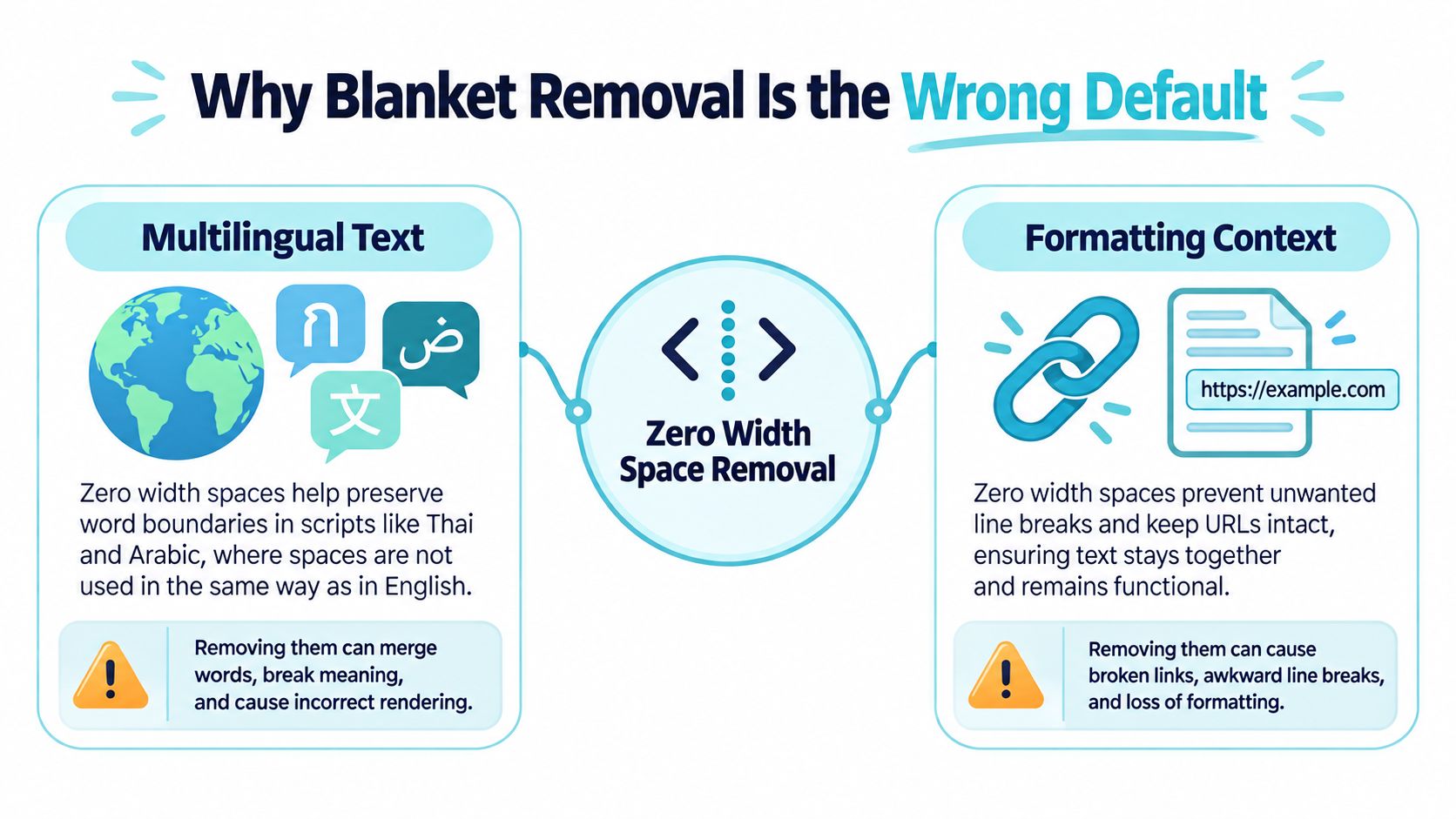
Check the script, check the location, and check the repetition pattern before you delete anything.
A Practical Detection Toolkit
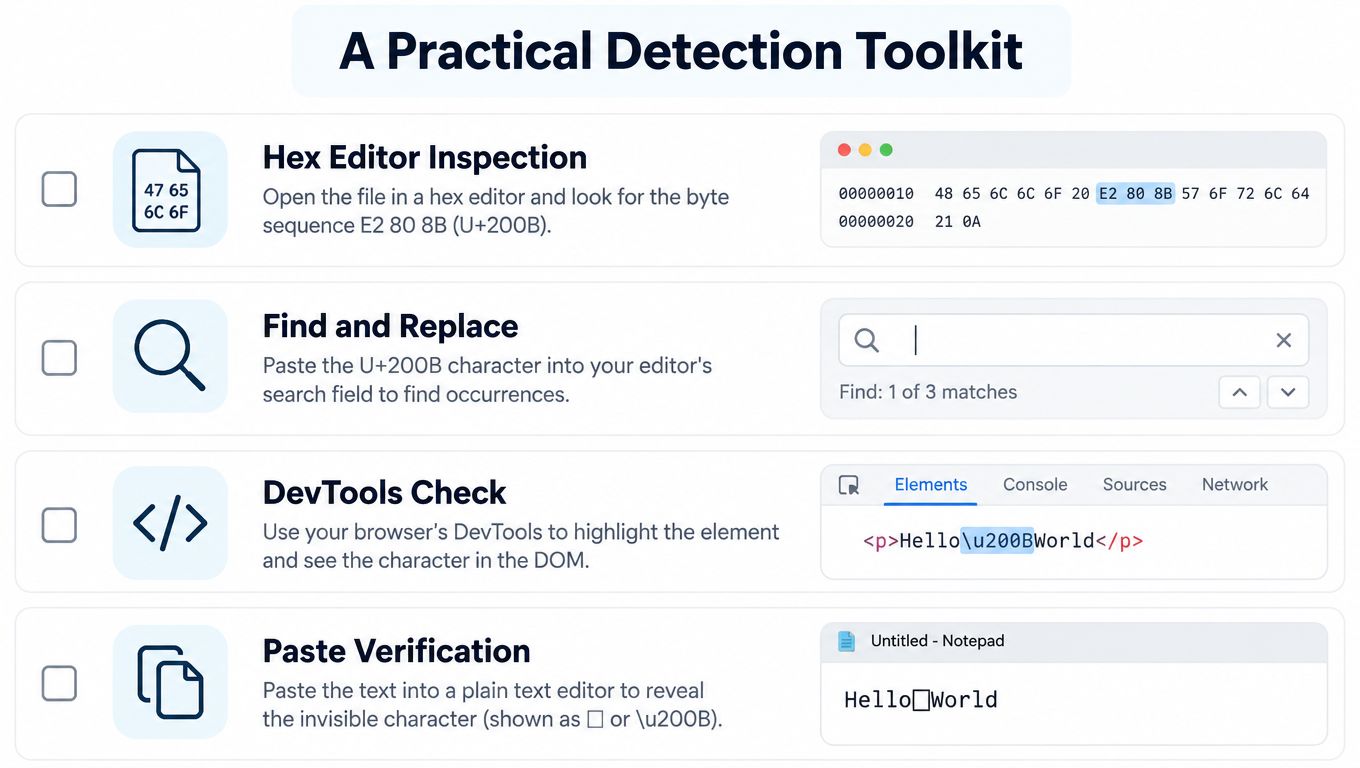
Start with the text itself. Paste it into a Unicode or hex viewer and look for U+200B directly. If you work in a code editor or shell, a regex search for \u200B catches the common case fast. If the text came from HTML, decode entities first, then scan the decoded result. That order matters because the character can hide in markup until it's expanded.
Fast checks that actually work
A byte-versus-code-point mismatch is another good clue. ZWSP is three bytes in UTF-8, so a string length that doesn't match what you visually count is worth inspecting. Compare the stored bytes against the displayed text, not against your memory of what you copied.
- Hex viewer: best for raw files and source snippets.
- Regex search: best for editor-level cleanup.
- HTML decode first: best for web content and scraped text.
- Byte count check: best for spotting hidden characters in pipelines.
For teams that validate incoming text before it lands in a system, data validation with NanoPIM is a relevant read because hidden characters are a validation problem, not just a formatting problem. If you want a paste-clean-copy workflow with local scan feedback, use Simple Unmark's invisible character remover once you've confirmed you're dealing with stray text, not meaningful script behavior.
Removing Zero Width Spaces Without Regrets
If you are cleaning plain Latin text, delete the stray character and move on. Manual removal is safest in editors that show invisibles, but it does not scale. Regex cleanup is fast, but it can hit the wrong thing if you aim too broadly. A dedicated paste-clean-copy tool fits the cases where the text came from AI output or a web page and you need the hidden junk gone before you use it again.
Pick the tool by the risk
For routine cleanup, a copy-paste workflow is enough. Paste the text, scan it, clean it, and copy the result. Simple Unmark follows that pattern, shows which code points were present before cleanup, removes hidden Unicode while reducing probabilistic watermark signals such as SynthID, and supports up to 5,000 words per request at 0.1 credit per started 100 words. For heavier cleanup, use Simple Unmark's invisible character remover or use a script when you need a stricter audit trail.
Keep a before/after character-level diff. If you cannot review what changed, you are guessing.
The AI watermark remover belongs in the same toolbox when the task is not just stripping a stray break character. It handles text that needs deeper cleanup without pretending invisible Unicode is always harmless.
For messy inputs, keep an audit copy of the original and use the lightest method that fits the risk. The method matters less than being able to prove what changed.
When to Keep the Character and When to Strip It
Ask three questions. What script is this in. Where did it come from. What's going to consume it next. If it's Thai, Myanmar, Khmer, or Japanese prose, keep the break marker unless you have a very good reason to remove it. If it's Latin copy-paste, a CSV export, or a product slug, strip it. If it's a URL or an AI-agent config file, audit it hard before touching it.
Use context, not superstition
The wrong default is blanket deletion. The right default is controlled cleanup with a saved original, especially when the text came from a source you don't fully trust. If you need a practical reference for handling hidden Unicode in mixed content, Simple Unmark's guide to hidden Unicode versus statistical watermarks is worth bookmarking because it separates routine cleanup from more suspicious text handling.
Invisible doesn't mean harmless, but invisible also doesn't always mean garbage. Inspect first, then delete only when the context makes that safe.
If you're dealing with stray zero width spaces in pasted text, Simple Unmark gives you a clean paste-scan-copy workflow and shows the hidden characters before you remove them. If you want the messy copy-paste case handled without guesswork, visit Simple Unmark and use it on the text that keeps breaking your search, validation, or layout.
- zero width space
- U+200B
- invisible characters
- Unicode cleanup
- copy paste fix
More posts
Plain Text Converter Guide: Clean AI Output
Learn how a plain text converter removes invisible Unicode characters and AI watermarks. Discover the difference between stripping text and intelligent
AI Essay Rewriter: What It Is and How It Works
Understand how AI essay rewriters function, their benefits for text improvement, and practical strategies for using them responsibly in your writing.
AI Text Converter Guide: What It Does and When to Use It
Learn what AI text converters actually do, how they work, when they help, and the real limitations. Honest guide for writers and editors.