
Plain Text Converter Guide: Clean AI Output
Learn how a plain text converter removes invisible Unicode characters and AI watermarks. Discover the difference between stripping text and intelligent
A plain text converter strips formatting and can clean invisible Unicode, but it does not remove a statistical watermark like SynthID. If you want watermark reduction, you need rewriting, not just character stripping.
Most advice gets this wrong on purpose or by laziness. It treats “convert to plain text” as if it solves formatting cleanup, copy safety, and AI detection in one move. It doesn't.
Table of Contents
- What a Plain Text Converter Does
- The Invisible Character Problem in AI Output
- Why Standard Conversion Fails on AI Watermarks
- Simple Stripping vs Intelligent Rewriting
- When to Use Simple Unmark and Similar Tools
- Limitations and the Future of Text Verification
What a Plain Text Converter Does
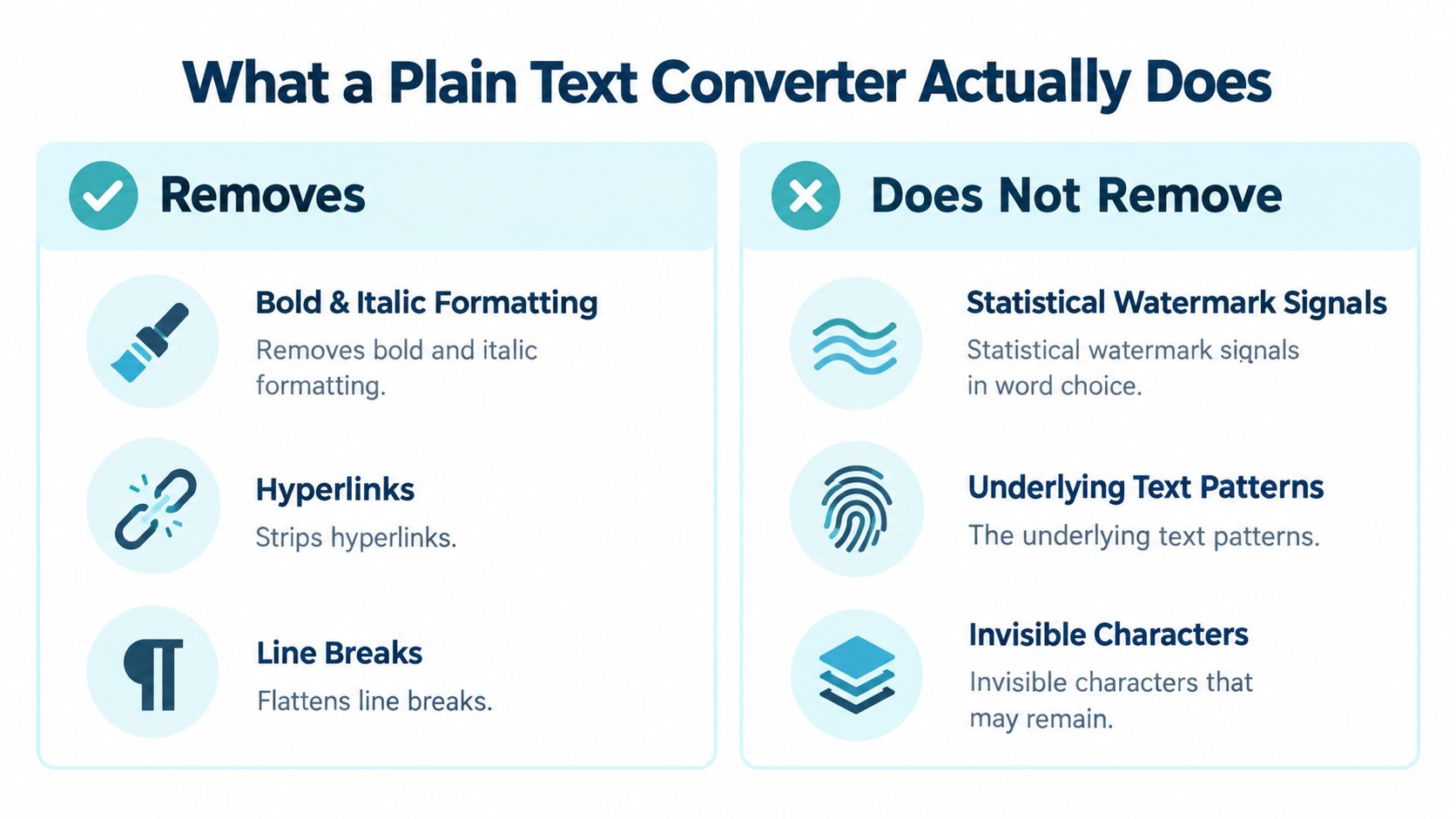
A plain text converter is a cleanup tool, not a truth machine. It removes rich-text styling, flattens layout, and clears away the visual junk that comes from editors, email clients, and CMS fields. That helps, but it does not make text safe, indexable, or free of machine traces.
The common mistake is assuming one paste clears everything. It does not. Text can still carry invisible Unicode marks, and it can still carry statistical patterns that reflect how the words were written in the first place. The same split between extraction and cleanup shows up in web data work, where teams compare rivals with scraped web text only after the raw pull has been cleaned.
What gets removed and what stays behind
Formatting cleanup handles the obvious layer. It strips bold, italics, hyperlinks, and layout artifacts that do not belong in a copy-safe draft. Editors use this kind of cleanup before they touch the text again.
What stays behind is the part people do not see. Invisible characters can survive the trip, and statistical watermarks definitely do. Those are different problems, and treating them as the same is how teams end up with text that looks clean but still behaves badly in search, indexing, or detection workflows.
Practical rule: if the output still needs to be copied, searched, compared, or indexed, plain text conversion is only step one.
The Invisible Character Problem in AI Output
Copying AI-generated text often carries more than words. Zero-width spaces, direction marks, odd spacing, and other Unicode controls can survive the copy step even though they never appear on screen. That is where clean-looking text starts causing ugly operational problems.
Unicode was built to make plain text interoperable across systems. The project began in 1988, the Unicode Consortium formed in January 1991, and Unicode Version 1.0 shipped in October 1991 with 7,161 encoded characters, later expanding beyond the old 16-bit limit with Unicode 2.0 in 1996 source. UTF-8 became the practical bridge, and the web now overwhelmingly uses it, with W3C citing about 98.3% of all web pages in 2024 source.
Why normalization alone isn't enough
Normalization helps, but it does not finish the job. Compatibility normalization can collapse some equivalents, like a non-breaking space into a regular space, yet it will not reliably remove zero-width characters, directional controls, or tags that carry encoded meaning source. If text needs to be copy-safe, searchable, and valid for downstream systems, normalization on its own falls short.
A dependable pipeline does more than normalize. It decodes as Unicode, applies the right compatibility policy, detects control characters, replaces unusual whitespace where it is safe, removes disallowed zero-width and direction controls, and validates the result before indexing or copying. Invisible controls can change tokenization, text direction, search behavior, and displayed order without changing the sentence people think they are reading.
Where this breaks in real workflows
Plain text still fails in real workflows. An API endpoint can reject a payload that looks fine in your editor. An email signature can pick up stray spacing or direction marks and render badly. Search tools can miss the string entirely because the byte stream is not what it appears to be.
For the cleanup step, a dedicated invisible character remover handles zero-width marks and direction controls that normalization misses. Use a text cleaner for formatting removal, then run a dedicated invisible-character scan when the content will be reused, validated, or indexed. The security posture for agent deployments matters for the same reason: hidden text artifacts create quiet failures that only show up after something breaks.
Why Standard Conversion Fails on AI Watermarks
Standard plain text conversion does not remove an AI watermark. That distinction matters, because tools like SynthID Text alter token selection during generation, so the signal lives in the word choices themselves, not in a hidden character you can strip away with a paste step source.
Plain text cleanup can remove formatting, invisible whitespace, and other copy problems, but it leaves the statistical pattern intact. If the same token-level choices remain, a detector still has material to examine. The difference between hidden Unicode and statistical watermarks is explained in detail in our guide on the two failure modes: hidden Unicode vs statistical watermarks.
Rewriting is a different operation
To reduce a statistical watermark, you need meaning-preserving rewriting. Google says its detector can tolerate cropping, minor edits, and mild paraphrasing, while confidence can drop after thorough rewriting or translation. IBM's overview reaches the same practical conclusion, paraphrasing and back-translation can sharply reduce detection, and in some cases paraphrasing removes the signal altogether source.
That is a different job from cleanup. Stripping is deterministic cleanup. Rewriting is a linguistic transformation with fidelity risks.
Clean text is not the same thing as untraceable text.
Why this matters for editors and reviewers
If the goal is copy-safe output, stop at cleaning. If the goal is to change how a detector reads the text, the draft needs a rewrite, and that means protecting facts, named entities, quotations, and tone. Over-processing turns accurate copy into something less reliable than the original.
Recent reporting on SynthID also shows why confidence should stay low after a converter or rewrite pass. In that setting, paraphrase removed detection in a large share of tested cases, and the same reporting noted a false-positive rate on clean text source. A detector score is not proof of authorship.
Simple Stripping vs Intelligent Rewriting
Before choosing a tool, identify the problem: formatting, invisible Unicode, or a statistical signal. Those are separate jobs, and confusing them leads to bad results.
Simple stripping is a hygiene move. It removes formatting, hyperlinks, line-break clutter, and obvious invisible artifacts. That is enough when the copy is messy, the layout is broken, or text will not paste cleanly into another system.
Intelligent rewriting does something else. It changes phrasing to disrupt the statistical pattern while preserving meaning, facts, names, and tone. That is the part that matters when watermark-style signals are involved. A cleaner-looking draft is not the same thing as a rewritten one.
Choose the least aggressive fix that solves the problem at hand
If a draft only needs to look normal, stripping is enough. If it has to survive publication review, compliance review, or an editorial pass where AI detection is a concern, stripping alone is the wrong tool. More aggressive normalization is not automatically better, because it can damage legitimate language behavior, especially in multilingual text and right-to-left scripts.
Use a layered workflow. Clean the text first. Then decide whether you are dealing with formatting, invisible Unicode, or a statistical watermark. Only the last case needs rewriting, and the rewrite has to stay controlled, not careless.
What good rewriting should preserve
A rewriting pass should keep the things editors care about.
- Facts: Do not change the meaning of the claims.
- Numbers: Keep figures intact unless the source text is wrong.
- Proper nouns: Names, brands, and titles should survive unchanged.
- Tone: A technical draft should still read like a technical draft.
- Intent: The point of the sentence should not drift.
That is the line between cleanup and content damage. A converter that only strips characters cannot make that call. A rewrite workflow can, but only if it protects fidelity instead of chasing a cosmetic result.
When to Use Simple Unmark and Similar Tools
Use a plain text converter when the problem is formatting. Use a rewrite-capable tool when the problem is statistical signal. That split matters because invisible character cleanup and watermark removal solve different problems.
Simple Unmark is built around that distinction. It handles hidden Unicode cleanup and rewrite-based watermark reduction in one flow. If you are deciding whether a single run is enough, the product details at Simple Unmark and the AI watermark remover page show the limits clearly. It supports up to 5,000 words per request, charges 0.1 credit per started 100 words, and gives three free cleans of up to 100 words without an account. Those three numbers tell you whether a single run covers your draft and what it will cost before you sign in.
How to use it without wasting time
Start with the smallest possible edit.
- Paste the text. Let the tool scan for invisible artifacts first.
- Check the cleanup result. If the only issue is formatting or hidden Unicode, stop there.
- Rewrite only when needed. If watermark risk matters, run the rewrite layer.
- Verify the output. Read for facts, names, and tone before publishing.
That workflow keeps you from over-processing everything. Editors and compliance teams should use that discipline, because the goal is not more cleaning. The goal is clean text that still says exactly what the original said.
Simple Unmark treats guest submissions as transient, which fits this workflow. You should not need a long-term record just to remove invisible garbage from a draft.
Limitations and the Future of Text Verification
No converter can guarantee a detector result. Watermark detection is probabilistic, detectors change, and output length matters. Once you add rewriting, the line between sanitization and attribution gets even fuzzier.
That's why high-stakes use needs more than an automated score. Keep provenance records, compare against the source document, and use human review for anything that affects publication, compliance, grading, or legal judgment. Clean text is useful. Verified human authorship is a different claim, and you shouldn't confuse them.
If you want a cleaner workflow without the usual marketing nonsense, use Simple Unmark for the jobs that plain text conversion can't do. It strips hidden Unicode, rewrites when watermark reduction matters, and keeps the process simple enough for editors who need results, not hype.
- plain text converter
- ai watermark remover
- unicode cleanup
- simple unmark
- text cleaning
More posts
AI Essay Rewriter: What It Is and How It Works
Understand how AI essay rewriters function, their benefits for text improvement, and practical strategies for using them responsibly in your writing.
AI Text Converter Guide: What It Does and When to Use It
Learn what AI text converters actually do, how they work, when they help, and the real limitations. Honest guide for writers and editors.
10 Free AI Rewriter Tool Options Compared for 2026
Find the right free AI rewriter tool fast. We compare 10 options by free limits, privacy, strengths, and weaknesses, with honest notes for writers.