
How to Rewrite AI Generated Text Without Losing Meaning
Learn how to rewrite AI generated text while keeping facts, tone, and intent intact. Practical steps, tool workflows, and tips to reduce watermark signals.
You've pasted a polished AI draft into a document, and it reads fine until a detector flags it. Then you spend hours swapping adjectives, changing a few verbs, and moving commas around. The wording looks different, but the result still feels machine-made, and hidden characters may still be sitting inside the text.
To rewrite AI-generated text properly, treat it as two separate jobs. First, rewrite the language thoroughly enough to disrupt repeated token patterns while preserving the meaning. Then clean invisible Unicode characters that can survive copy and paste. A surface polish is not enough.
Table of Contents
- Why Rewriting AI Text Is Harder Than It Looks
- How AI Watermarks Hide in Token Patterns
- Manual Rewrite Techniques That Preserve Meaning
- Using Simple Unmark for Faster AI Text Rewriting
- Cleaning Hidden Unicode and Invisible Characters
- Common Mistakes That Leave Watermark Signals Behind
- Final Verification and Realistic Expectations
Why Rewriting AI Text Is Harder Than It Looks
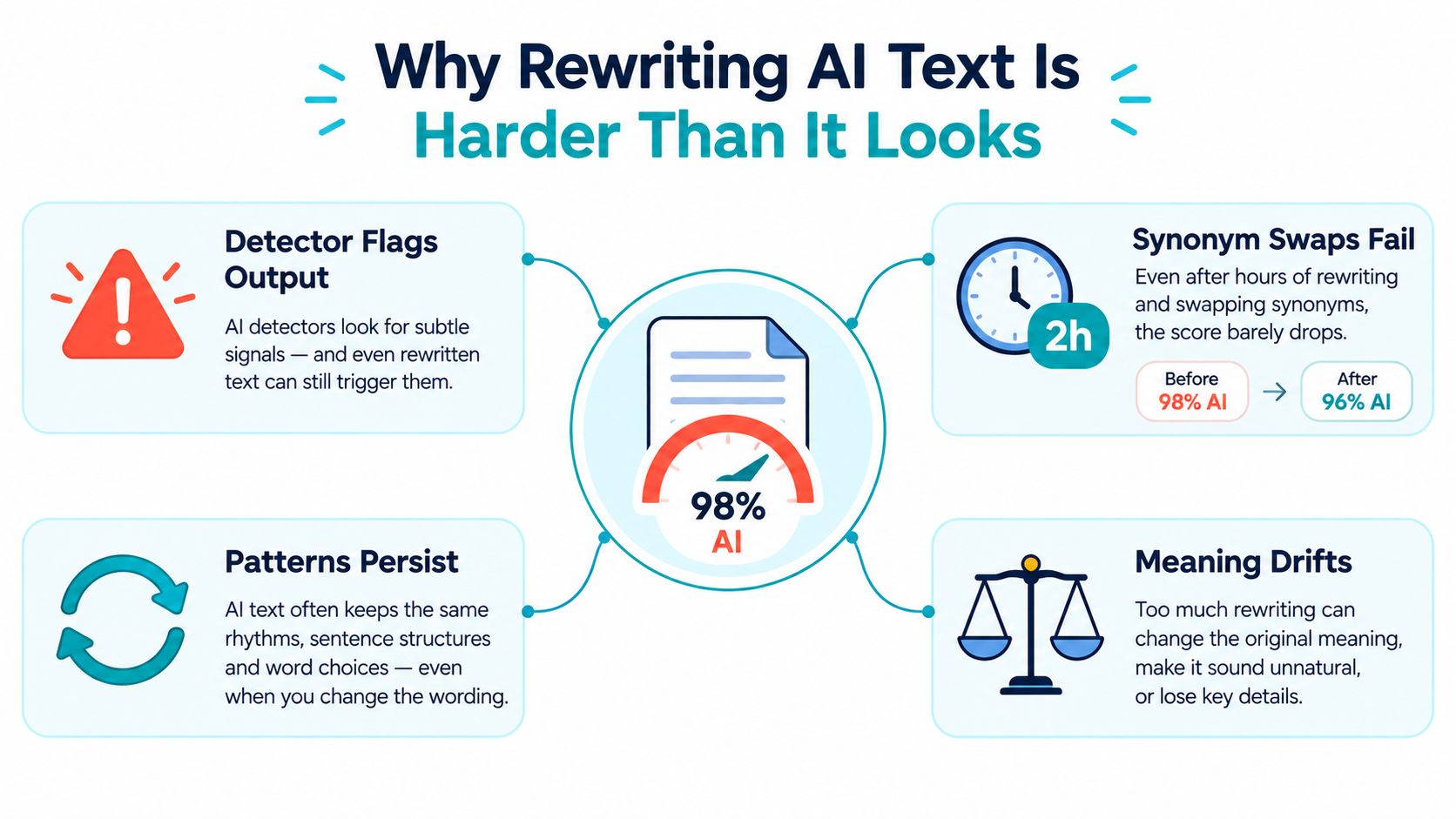
AI text can carry problems that readers can't see. One layer is statistical. Watermarking systems can influence which tokens a model selects, creating patterns across vocabulary, punctuation, and sentence construction. Another layer is technical. Copy-pasted text may contain zero-width spaces, soft hyphens, direction marks, or other formatting controls that look blank in a normal editor.
A valid rewrite must preserve the parts that matter:
- Facts and numbers: Don't alter claims, measurements, dates, or percentages.
- Proper nouns: Keep company names, products, people, and place names accurate.
- Citation links: Preserve sources and attach them to the same claims.
- Tone and intent: A formal explanation shouldn't become casual marketing copy.
- Structure of meaning: You can change the sentence architecture without changing the point.
The mistake is treating rewriting as synonym replacement. A detector doesn't necessarily care that you changed “important” to “significant.” It may still recognize the broader token-choice pattern across the paragraph. The standard watermarking pipeline embeds a signal during generation and verifies it through token-distribution tests, as described in this guide to how AI text watermarks work.
Editor's rule: Rewrite the sentence structure, not just the vocabulary. Then inspect the characters beneath the wording.
For practical advice on changing robotic phrasing without flattening the author's voice, use this editor's guide on humanizers. It addresses the writing problem. It doesn't replace a Unicode check.
How AI Watermarks Hide in Token Patterns
A token is a small text unit. Depending on the tokenizer, it can be a complete word, part of a word, punctuation, or a space attached to a word. A probabilistic watermark subtly favors a selected group of tokens during generation. The prose remains readable, but its token choices become statistically unusual across a sufficiently long passage.
The detector tests whether preferred tokens appear more often than chance would normally allow. This signal is not visible on the page. Bold formatting, sentence spacing, and routine proofreading do not reliably remove it. Changing a few adjectives can leave most of the original distribution untouched.
A separate problem sits at the character layer. Hidden Unicode characters can survive a rewrite even after the wording changes. Editors should check both layers. For a clear comparison, read this guide to hidden Unicode and statistical watermarks.
The scale varies by benchmark. In a 2026 test using Gemma-7B and the ELI5 dataset, SynthID-Text reached a true positive rate of 85% at a 1% false positive rate, compared with 73% for the cited baseline, according to this analysis of SynthID-Text detection. That result applies to the stated benchmark, not every detector or document.
| Edit level | Typical detection result | What it means |
|---|---|---|
| Untouched watermarked text | Benchmark-dependent | Detection relies on token-distribution patterns, not visible wording alone. |
| Light synonym edits | No universal score | A few substitutions can leave the broader pattern intact. |
| Meaning-preserving paraphrase | 98.3% detection elimination in one study | Results vary by detector and rewrite depth, as reported in this study on paraphrase and watermark detection. |
| Full structural rewrite | No guaranteed score | The result still requires checks for meaning, artifacts, and detector behavior. |
The practical distinction is between changing words and changing choices. Reordering clauses, replacing predictable sentence openings, combining short sentences, and splitting overloaded ones alter the distribution more substantially than synonym swaps. That makes the rewrite meaningful, not automatically undetectable.
Manual Rewrite Techniques That Preserve Meaning
Start with a fact sheet, not a thesaurus. Before touching the prose, copy every number, date, named entity, product name, quotation, and citation into a side list. This protects the locked elements while you rebuild the language around them.
Next, strip each paragraph down to its logic. Identify the claim, the evidence, the qualification, and the conclusion. Reorder clauses where the meaning allows it. Change the opening position of sentences. Replace a passive construction with an active one when the actor is clear. Don't add opinions or examples that weren't in the source.
A sentence-by-sentence workflow
- Extract the fixed elements. Mark facts, links, names, figures, and required terminology.
- Build a new skeleton. Decide what the paragraph should say first, second, and last.
- Rewrite in complete constructions. Replace the sentence, rather than patching individual words.
- Compare side by side. Check that the claim, scope, tone, and intent still match.
- Read aloud. Awkward rhythm is often easier to hear than to spot on screen.
Here's a compact example. The following is a constructed sample, not a reported case study.
AI-style draft, 50 words:
“BrandPilot provides a solution for marketing teams seeking to improve campaign efficiency. Its dashboard centralizes planning, reporting, and collaboration, helping users make informed decisions. The platform's flexible workflows support businesses at different stages, while automated recommendations encourage consistent optimization across channels and contribute to stronger long-term performance.”
Human-tone rewrite:
“BrandPilot puts campaign planning, reporting, and team feedback in one dashboard. That's useful when work is scattered across spreadsheets and chat threads. The workflows can adapt as a team grows, but the recommendations still need judgment. Use the platform to organize decisions, not to outsource them.”
The rewrite preserves the brand name and the original claims about centralization, workflows, recommendations, and team use. It removes inflated phrasing by changing the paragraph's structure and adding a clear limitation already implied by responsible editing.
Don't “humanize” a technical document by inserting slang. A human voice comes from specific judgments, varied syntax, and clear ownership of claims. It doesn't come from random informality.
Using Simple Unmark for Faster AI Text Rewriting
A short passage is usually faster to edit by hand. For a longer draft, scan first. The scan shows whether you need a meaning-preserving rewrite, invisible-character cleanup, or both.
Use this workflow:
- Paste the draft into the editor. Keep the original open for comparison.
- Run the scan. Review highlighted watermark and Unicode findings at paragraph level.
- Copy the cleaned output. Return it to the working document, then check facts and tone against the source.
Simple Unmark processes one document up to 5,000 words, priced at 0.1 credit per started 100 words, and purchased credits never expire. A 1,200-word draft therefore costs 1.2 credits, rounded up to the next started 100 words. Use those terms when planning batches. A scan speeds up inspection, but it does not replace editorial judgment. You still own every claim.
Use a clear decision rule
- Under 300 words: Rewrite by hand so you can control every sentence.
- From 300 to 1,500 words: Scan first for hidden characters, then make a targeted, meaning-preserving pass.
- Over 1,500 words: Scan first, divide the document into logical sections, and rewrite each section separately.
The tool earns its place when a draft contains repeated structures, copied passages, or hidden formatting that would take too long to inspect manually. Paragraph-level results show where the output changed, so you can spend time on those sections instead of rereading everything equally.
Compare the original and rewritten text side by side after each automated pass. Check facts, numbers, proper nouns, citation links, and tone. Restore anything that drifted. A cleaner detector result has no value if the rewrite introduces a false claim.

Cleaning Hidden Unicode and Invisible Characters
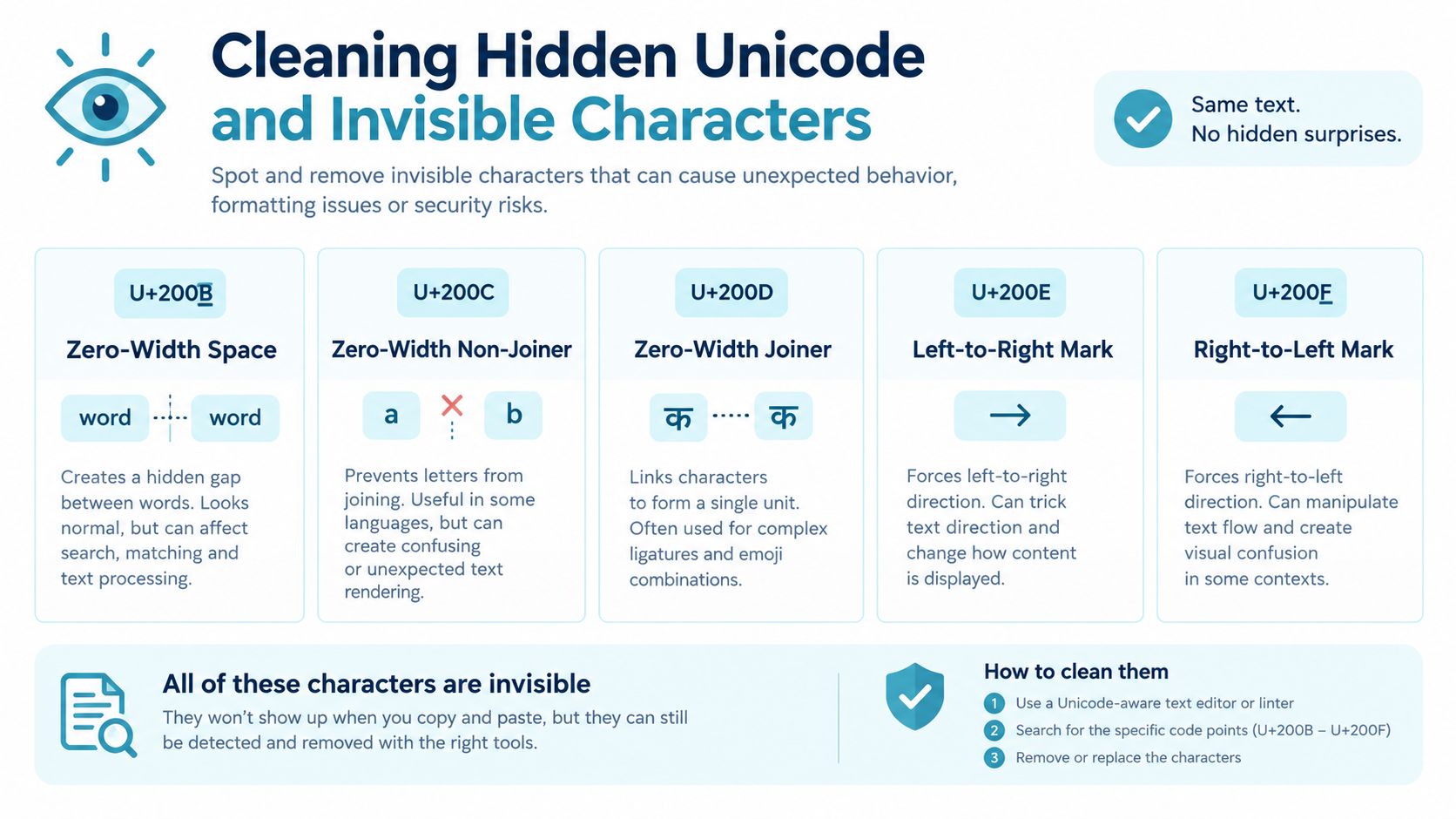
Invisible characters are a separate problem from AI wording. Common examples include the zero-width space U+200B, zero-width non-joiner U+200C, zero-width joiner U+200D, left-to-right mark U+200E, right-to-left mark U+200F, soft hyphen U+00AD, word joiner U+2060, and narrow no-break space U+202F.
Unicode defines U+200B as having no intrinsic width, while the zero-width joiner and non-joiner are format controls that are ordinarily ignored when software analyzes text content, as documented in the Unicode Core Specification. That invisibility is exactly why ordinary find-and-replace misses them. The editor renders an apparently normal gap, while character counts, regex patterns, search, and database ingestion see something different.
Verify the cleanup
Paste the text into an invisible character remover and check the Unicode findings. Then verify the result in a plain-text editor with a regex search such as:
[\u200B-\u200F\u202F\u2060\uFEFF]
If you prefer Python, a simple fallback is:
text = re.sub(r'[\u200B-\u200F\u202F\u2060\uFEFF]', '', text)
Import the re module first, and inspect the output rather than blindly overwriting the original. Notepad++ and VS Code also support Unicode-aware search through extensions or built-in regular-expression tools.
Clean invisible characters before rewriting, or at the same time. Don't leave them as a final afterthought.
Common Mistakes That Leave Watermark Signals Behind
Myth one, light synonym swaps are enough. They are not. Detectors examine token choices across a passage, so changing an adjective leaves the deeper pattern intact. Sentence rhythm, clause order, punctuation habits, and token distribution can remain nearly unchanged even when the wording looks different.
Myth two, a third-party humanizer guarantees a pass. That is marketing, not a technical guarantee. A surface rewriter may preserve the source structure, leave hidden Unicode artifacts untouched, or create a detectable pattern of its own. Detector reliability varies widely, so treat every “pass” claim as unverified. Test the result instead of trusting the tool's label.
Myth three, watermarks are unbeatable. That claim is too broad. Meaning-preserving paraphrase eliminated detection for 100% of initially detected KGW and Unigram texts and 98.3% of initially detected SynthID texts in one evaluation. The same research recorded a 5.4% false-positive rate on clean text. Those findings show instability, not a guaranteed escape route. Read the 2026 paraphrase-detection benchmark for the evaluation details.
| Editing Method | Avg. Detection Rate | Notes |
|---|---|---|
| Token-level touch-ups | Not established | Often leave enough of the original pattern intact. |
| Surface humanizer rewrite | Not established | May change wording while leaving hidden characters in place. |
| Meaning-preserving paraphrase | Detector-dependent | Can weaken detection sharply, but may introduce factual or tonal errors. |
| Deep rewrite plus Unicode cleanup | No guaranteed rate | The strongest practical workflow, followed by verification. |
Stop treating synonym swaps as a rewrite strategy. Use them only for isolated wording problems. For meaningful change, preserve the source's meaning while rebuilding its sentence structure, then remove invisible characters before checking the finished text. That combination addresses both the visible pattern and the hidden text layer.
Final Verification and Realistic Expectations
A rewrite isn't finished when the prose sounds smoother. Run these checks in order:
- Factual fidelity: Compare every claim, number, date, and qualification with the source.
- Proper nouns: Confirm names of people, products, organizations, and places.
- Tone alignment: Make sure the new version still serves the original audience and intent.
- Unicode cleanliness: Search for zero-width marks, direction controls, soft hyphens, and unusual spaces.
- Detector comparison: Run the text through two detection tools and treat conflicting results as a warning, not a verdict.
No method guarantees zero detection. Detector behavior changes, short passages can behave differently from long ones, and newer watermarking approaches continue to target resilience. A 2025 ACL paper describes STA-1 as preserving the original token distribution in expectation while offering statistical guarantees and stronger performance in low-entropy settings than existing unbiased watermarks, which is another reason not to assume that one successful rewrite defeats every future system. See the ACL paper
The practical goal is not invisibility. It is a clean, accurate document whose wording reflects a real editorial decision and whose hidden characters won't break downstream systems. For publishers making policy decisions, this guide to ethical AI use for publishers adds the governance context that a detector score can't provide.
Rewrite the language enough to change the underlying construction, clean the invisible Unicode layer, and verify the result against the original. That combination works better than cosmetic editing, but it still demands human judgment.
Use Simple Unmark to scan pasted AI text, remove hidden Unicode characters, and rewrite passages to reduce probabilistic watermark signals without losing key meaning. Start with a short section, compare the output against your source, and make the final editorial call yourself.
- rewrite ai generated text
- ai text rewriter
- remove ai watermarks
- clean ai text
- ai content tips
More posts
10 AI Paraphrase Tool Free Picks for Better Rewrites
Compare 10 ai paraphrase tool free options by features, limits, use cases, and drawbacks, plus when Simple Unmark is the better cleaning choice.
AI Plagiarism Remover: What It Is and What It Actually Does
An honest guide to AI plagiarism removers: how they differ from paraphrasers, what they can and cannot remove, plus a real cleaning workflow and example.
Watermark Removal Tool: What It Does and How It Works
Learn what a watermark removal tool actually does, how it tackles probabilistic marks like SynthID, and where Simple Unmark's approach stands out.