
How to Rewrite AI Content Without Losing Meaning
Learn how to rewrite AI content step by step while keeping facts, numbers, tone, and intent intact, plus how to strip hidden Unicode characters.
You've got a draft in front of you that almost works, but it reads like AI wrote it because AI did. The fix isn't to run it through a synonym spinner and hope for the best. Real rewrite AI content work means stripping accidental machine markers, cleaning invisible junk, protecting facts, and keeping a record of what changed.
If you treat it like one simple pass, you'll miss the part that matters. A clean rewrite has four layers, statistical rephrasing, Unicode sanitation, semantic protection, and evidence retention. I also like pointing writers to the practical coverage in the AI-assisted research blog from Rivul AI when they want a broader look at how AI draft cleanup fits into publishing workflows.
Table of Contents
- Why Rewriting AI Content Is Its Own Job
- How AI Watermarking Actually Works
- The Rewrite and Validate Workflow
- Cleaning Hidden Unicode Characters
- What Rewriting Does Not Prove
- Choosing a Tool That Does the Job
- A Repeatable Checklist for Your Next Draft
Why Rewriting AI Content Is Its Own Job
The moment usually looks the same. You paste in a decent AI draft, scan the first paragraph, and feel that it's technically usable but obviously off. The cadence is too even, the transitions are mushy, and the text sometimes carries hidden formatting that can cause trouble later.
That's why rewriting AI content is not the same as disguising authorship. It's about removing machine-shaped artifacts, making the prose readable, and keeping the piece safe for publication systems that don't like weird spacing or invisible controls. If you want a clean workflow, you need a sequence, not a trick.
The four layers that matter
First comes statistical rephrasing, which changes token choices and sentence shape instead of swapping a few words. Then comes Unicode sanitation, which removes hidden characters that can survive pasting and break markup. After that, semantic protection keeps numbers, names, URLs, and domain terms intact. Last comes evidence retention, which is the habit of saving the source draft, notes, and approvals so you can explain what changed.
That structure is the point. If a tool only does one of those jobs, it's only doing part of the work.
A writer who understands this doesn't waste time chasing magic. They clean the draft in the right order, and they know exactly what each pass can and can't prove.
How AI Watermarking Actually Works
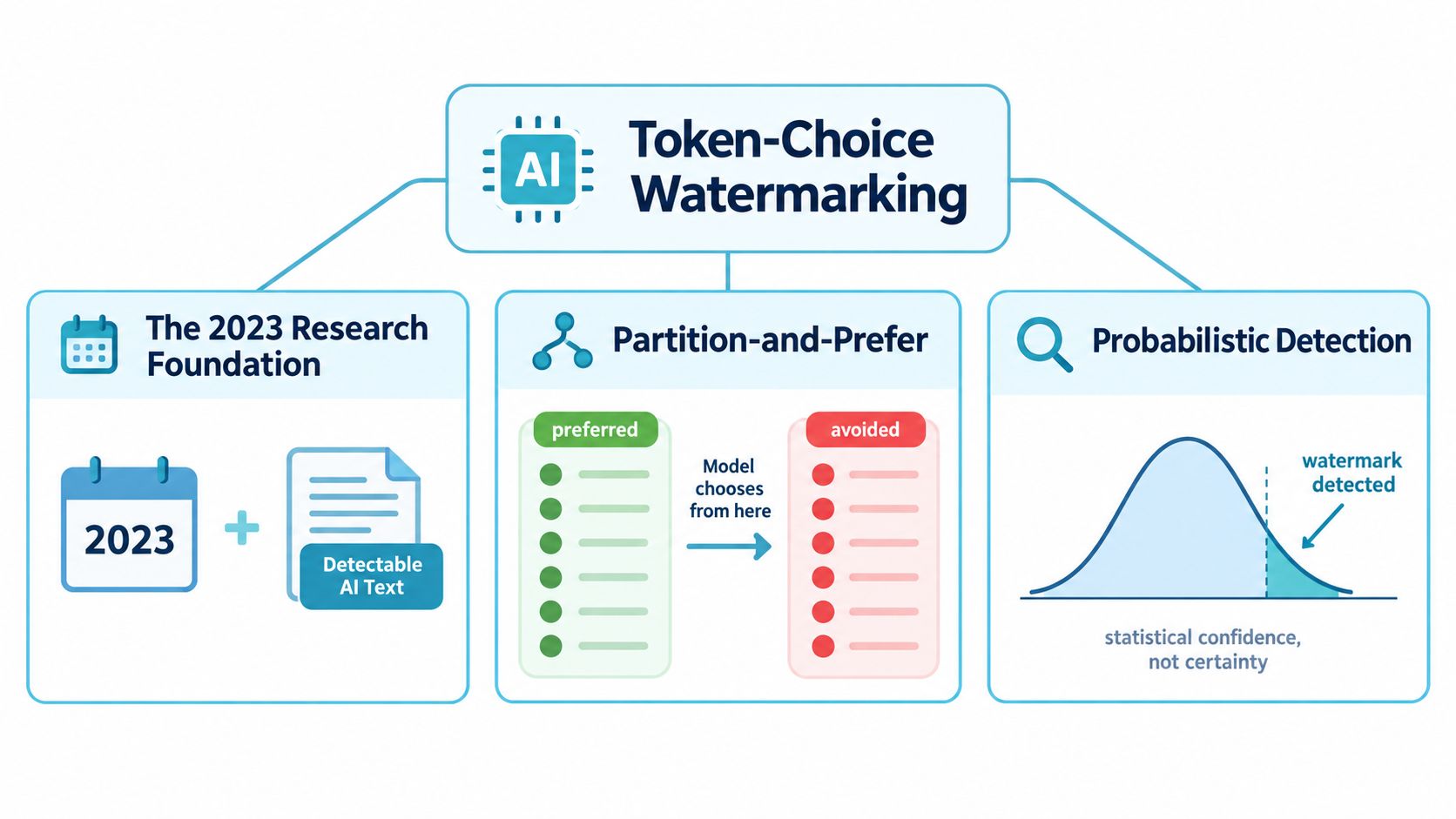
AI watermarking sits inside token choice, not on the surface of the page. The 2023 research foundation described a method that shifts token-selection probabilities, splits candidate tokens into statistically distinct groups, and then steers generation toward one group so the output carries a hidden pattern later detectable in the token distribution (research review).
What probabilistic detection means
Detection is probabilistic, not absolute. The detector checks whether the observed token pattern looks unlikely under ordinary human text or unwatermarked machine text. It is judging evidence, not handing down a final verdict. Once wording changes enough, the signal weakens even if the meaning stays intact.
That difference matters. Watermarking lives in word choice, so deleting a few suspicious terms does not remove the signal. You have to change the structure, not just the dressing, as explained in this guide to hidden Unicode vs statistical watermarks [https://simpleunmark.com/guides/hidden-unicode-vs-statistical-watermarks].
Google DeepMind's SynthID-Text made the limits clearer in 2024. It was used inside Gemini chatbots and evaluated across roughly 20 million real chatbot responses (MIT Technology Review). A closer quality review covered around 3,000 responses, and the reported result was that users did not detect a meaningful difference in quality or usefulness between watermarked and unwatermarked outputs.
Why light edits aren't enough
The same evidence points to a hard limit. Light editing and some text manipulation did not reliably break the signal, while substantial rewriting or translation could weaken it. That is why synonym swapping is a weak response. It changes the dressing, not the mechanism.
Practical rule: if the wording stays close to the source, the watermark signal probably stays close too.
The Rewrite and Validate Workflow
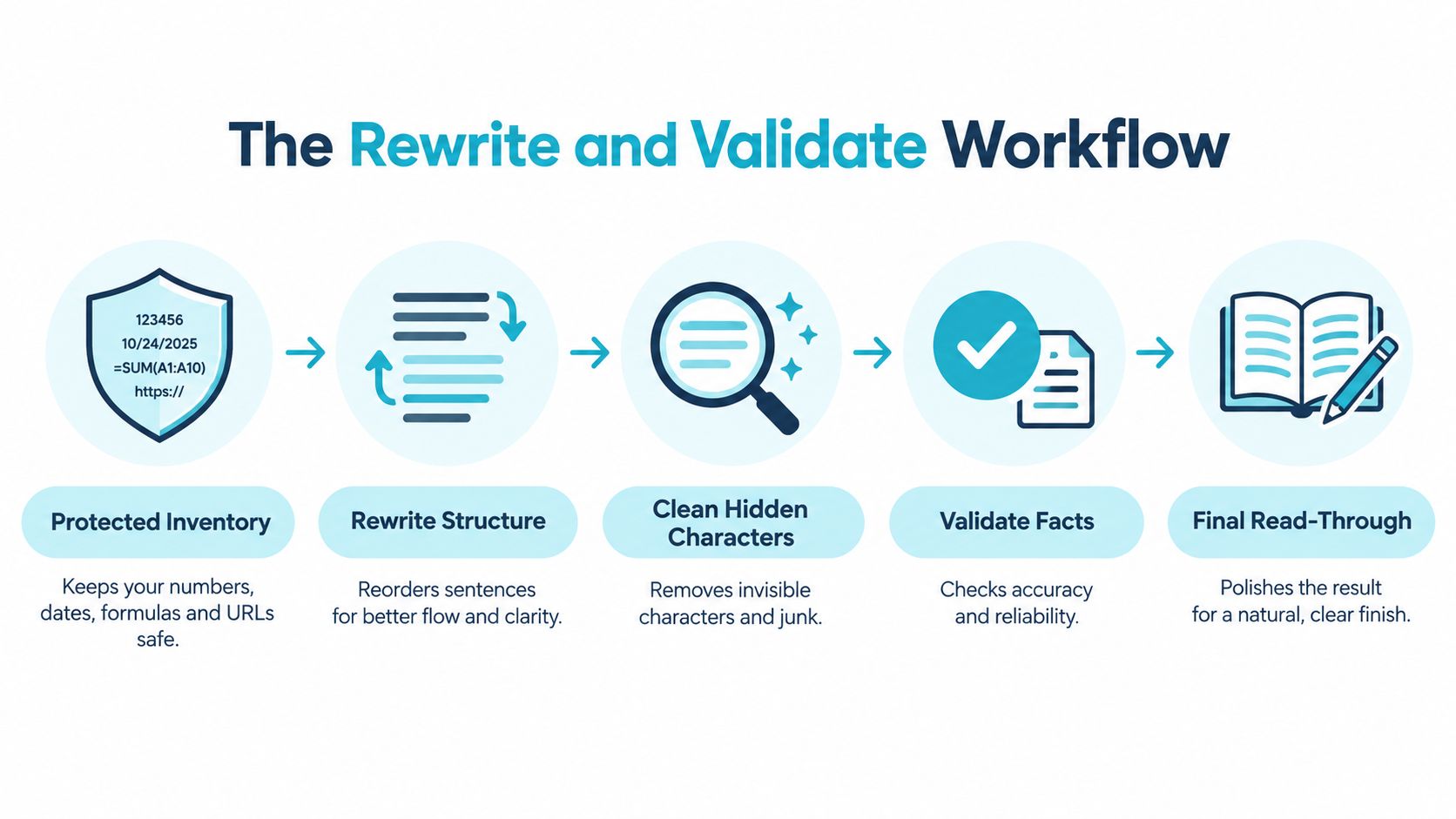
Start with a protected inventory. Lock down every number, date, formula, URL, citation, proper noun, and domain term before you touch the prose. If you don't do that first, you'll “improve” the draft by deleting the exact details that make it useful.
Then rewrite the structure, not just the words. Move clauses, split dense sentences, merge fragments, and change token choices so the result doesn't feel like a lightly spun version of the same paragraph. Here you make the draft sound human without mangling the meaning.
Validate against the source, not your memory
After the rewrite, compare the output against the source and your inventory. You're looking for semantic drift, missing qualifiers, and accidental substitutions. The goal is simple, keep the meaning stable while the surface form changes.
One benchmark reported DetectGPT accuracy falling from 70.3% to 4.6% at a 1% false-positive rate after paraphrasing, while another study found automated paraphrasing reduced AI-detector accuracy from a mean of 39.5% on unmodified AI text to 22.14% on adversarially modified text (arXiv). Those are benchmark-specific results, not guarantees for any one paragraph, but they prove the point. Real rephrasing changes detector behavior.
Next, scan for hidden Unicode. Default-ignorable characters, zero-width marks, and bidirectional controls can survive ordinary editing and create weird rendering or search problems. Finally, do a human read for tone, logic, and claim quality. That's the pass that catches the awkward phrasing software misses.
Keep the facts fixed, change the sentence shape, then clean the hidden junk. If you reverse that order, you'll waste time and still miss problems.
Cleaning Hidden Unicode Characters
When text is pasted from an AI tool, the visible words aren't always the whole story. You can also pick up zero-width joiners, zero-width spaces, bidirectional controls, soft hyphens, and odd spacing variants. Those characters don't always show up on screen, but they can break search, mess with copy-paste, and corrupt markup.
What these hidden characters do
Zero-width characters can create gaps that look normal while behaving badly underneath. Bidirectional controls can change display order in ways that make text appear scrambled in some environments. Soft hyphens can insert line-break behavior you didn't ask for, and unusual spacing can make two strings look identical while comparing as different.
A simple find-and-replace usually misses this mess because the characters aren't obvious. That's why Unicode cleanup should be a default pass, not a final polish. Handle it separately, and do it before you obsess over tone.
For a practical cleanup reference, the BarkerBooks manuscript cleanup guide is useful because it focuses on removing markup-like debris before a document goes out the door. If you want a dedicated pass for invisible marks, a clean-up tool like this invisible character remover fits the same job.
Treat paste-clean-copy as a habit
The fastest workflow is boring on purpose. Paste, clean, copy, and verify that the cleaned text still looks normal in the destination system. Don't wait until the final edit to find out the pasted draft carried invisible junk the whole time.
Hidden characters are a formatting problem first and a writing problem second. Fix them like a production issue, not a style preference.
What Rewriting Does Not Prove
A cleaner paragraph does not prove a human wrote it. Google's own SynthID documentation says detection is probabilistic, and that thorough rewriting or translation can greatly reduce detector confidence. An unflagged passage means the watermark was not detected, nothing more.
Keep the audit trail
The right workflow is evidence-preserving, not just output-focused. Keep the original draft, the prompts, the revision history, the source notes, and a record of which facts were checked and by whom. If a reviewer asks what changed, you need a chain they can inspect.
This matters most in legal, academic, and regulated settings. A detector pass is not authorship proof. As this explainer on AI watermarks vs AI detectors notes, it is just one probabilistic signal. In those settings, log the prompt version, model name, editor name, and fact-check date in a one-page revision sheet attached to the draft.
Important: reducing a watermark can improve privacy or remove accidental machine markers, but it can also weaken auditability.
That trade-off is the point. If the text needs to be usable and defensible, keep the rewrite and the documentation together. One without the other leaves a weak paper trail.
Choosing a Tool That Does the Job
The right tool depends on how much rewriting you need, whether Unicode cleanup is included, and whether the tool protects names and numbers. A prompt tweak is fine when you're cleaning a short draft for yourself. It's weak when you need structure changes and reliable cleanup.
A manual rewrite gives you control, but it costs time. A dedicated cleaner gives you a repeatable pipeline, which matters when you're doing this often. For occasional long passages, a transparent credit model with built-in Unicode cleanup beats subscriptions and hand-rolled fixes.
Comparing ways to rewrite AI content
| Approach | Rephrasing depth | Unicode cleanup | Fact protection | Cost model |
|---|---|---|---|---|
| Manual rewrite | High if the editor is good | Depends on the editor | Strong if the editor is careful | Time cost |
| Prompt and tweak | Moderate | Usually absent | Mixed, because details can drift | Usually hidden in a general AI plan |
| Dedicated cleaner | High, because it rewrites structure | Included by design | Explicit inventory handling | Transparent per-run credit model |
A cleaner like AI dictation and writing tools compared is useful background if you're sorting through broader writing workflows, but the main question here is simpler. Does the tool change wording enough, strip hidden Unicode, and keep your facts intact?
The useful limits are straightforward. A run can go up to 5,000 words, pricing is 0.1 credit per started 100 words, and guests get three free 100-word cleans before they need an account. That kind of clarity helps you match the tool to the job instead of paying for features you won't use.
A Repeatable Checklist for Your Next Draft
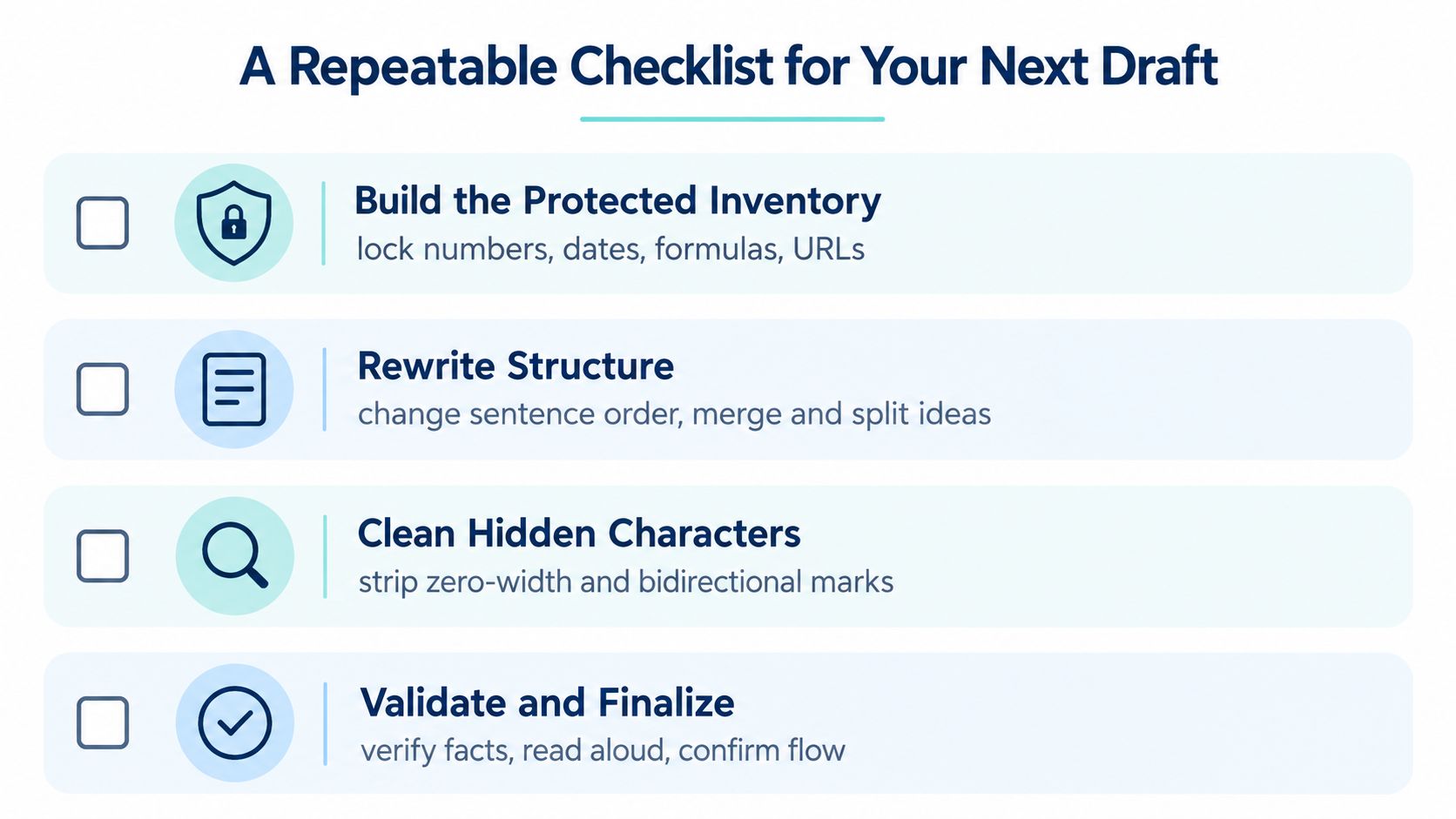
- Build the protected inventory, lock numbers, dates, formulas, URLs, and names before editing.
- Rewrite structure, change sentence order, clause shape, and transitions instead of swapping surface synonyms.
- Clean hidden characters, remove zero-width and bidirectional marks before final review.
- Validate and finalize, check facts, read for tone, and save what changed.
That's the whole job. A rewrite that removes a watermark can help with privacy, but it also weakens auditability, so keep the draft trail and approval record. If you want a cleaner workflow for rewrite AI content tasks, Simple Unmark gives you a place to clean hidden Unicode, rephrase the wording, and keep the result usable without pretending it proves authorship.
- rewrite ai content
- ai text cleaner
- synthid remover
- ai watermark
- unicode cleanup
More posts
AI Content Rewriter: How It Works and What to Expect
An AI content rewriter changes wording and sentence structure to keep meaning intact. Learn how it works, what it can and can't do, and how it differs

Zero Width Space: What It Is and How to Remove It
Zero width space explained: what it is, why it breaks copied text, and how to detect and remove U+200B without breaking real formatting.
Plain Text Converter Guide: Clean AI Output
Learn how a plain text converter removes invisible Unicode characters and AI watermarks. Discover the difference between stripping text and intelligent