
Invisible Character Copy: What It Is and How to Clean It
Invisible character copy explained: what zero-width and bidi characters are, why copied text hides them, and practical methods to detect and remove them safely.
You paste a paragraph into a form, and the text looks normal. Then the search fails, a CSV import breaks, or a code editor rejects a line that appears empty. The problem is often invisible character copy, text that looks blank but still contains Unicode code points.
The fix isn't “delete every hidden character.” Some invisible characters control Arabic shaping, Indic text, bidirectional display, line breaking, or emoji sequences. Clean the wrong ones and you'll damage legitimate text. Clean by code point, preserve characters your languages need, and verify the result in the application where it will be used.
Table of Contents
- What Invisible Character Copy Actually Is
- Why Invisible Characters Survive Copy and Paste
- The AI Watermark Myth and What Cleaning Can and Cannot Do
- How to Detect Hidden Characters in Pasted Text
- Tools and Workflows to Remove Them
- Safe Cleanup Without Breaking Real Text
What Invisible Character Copy Actually Is
An invisible character is still part of the underlying string. “Invisible” usually means it has no visible glyph or advance width in a default font. It doesn't mean the character is absent from the copied data.
The most familiar example is U+200B ZERO WIDTH SPACE. Unicode defines it as a possible word or line-break location, especially useful in scripts that don't conventionally separate words with visible spaces, including Thai, Myanmar, Khmer, and Japanese. A copied string can therefore retain U+200B even when the reader sees nothing.
Other code points serve different purposes:
- U+200C ZERO WIDTH NON-JOINER, or ZWNJ, prevents certain characters from joining. It can be linguistically meaningful in Arabic and Indic writing.
- U+200D ZERO WIDTH JOINER, or ZWJ, connects characters for script shaping and emoji sequences.
- U+2060 WORD JOINER prevents a line break without displaying a width.
- U+00AD SOFT HYPHEN marks a possible hyphenation point and may appear only when text reflows.
- U+202A through U+202E are bidirectional embedding, override, and formatting controls. They can change visual order while remaining invisible.
- U+FEFF can act as a byte-order mark at the start of text, although Unicode recommends U+2060 for new word-joining use.
- U+180E MONGOLIAN VOWEL SEPARATOR may appear in legacy or transferred text and should be classified by context before removal.
Unicode treats these characters as different tools, not one universal category of junk. The Unicode Standard's chapter on special characters explains why cleaning must distinguish linguistic controls, word boundaries, byte-order markers, and formatting artifacts.
Common Invisible Unicode Code Points
| Code Point | Name | Visual Effect |
|---|---|---|
| U+200B | ZERO WIDTH SPACE | Creates a possible break with no visible space |
| U+200C | ZERO WIDTH NON-JOINER | Prevents joining without a visible mark |
| U+200D | ZERO WIDTH JOINER | Joins characters or emoji sequences |
| U+2060 | WORD JOINER | Prevents line breaks invisibly |
| U+00AD | SOFT HYPHEN | Appears only when a line breaks at that point |
| U+202A–U+202E | Bidirectional controls | Changes visual text direction or ordering |
| U+FEFF | Byte-order mark | Usually invisible, commonly meaningful at a file start |
| U+180E | MONGOLIAN VOWEL SEPARATOR | May remain invisible in transferred or legacy text |
A practical first pass is to identify the exact code point, not guess from how the text looks. For a quick one-off inspection, use an invisible character remover, then check whether the flagged character is accidental or required by the language.
Why Invisible Characters Survive Copy and Paste
Copy and paste moves more than visible shapes. The clipboard carries an underlying sequence of Unicode values, while the application decides how to render that sequence. A zero-width character can transfer intact even though the screen has no glyph to display.
That explains why copying from a browser, PDF, rich-text editor, or office application can preserve formatting controls after the visible styling disappears. The destination may discard HTML or RTF presentation details while retaining code points such as zero-width spaces, soft hyphens, directional marks, and byte-order markers.
The clipboard preserves data, not your visual impression
A browser can show two strings as identical while a search engine, parser, database, or compiler treats them as different. Bidirectional controls add another problem: the displayed order can differ from the logical order stored in the string. Unicode security guidance documents this distinction and connects it to risks such as visually misleading source code in the Unicode security considerations.
GUI copy also isn't identical to terminal copy. A terminal command such as pbcopy, xsel, or a tmux buffer generally passes the raw text stream, while a GUI application may expose HTML, RTF, and plain-text clipboard formats at the same time. The receiving application chooses which representation to consume. That choice can change line endings, markup, and formatting artifacts, but it doesn't guarantee that hidden Unicode controls will disappear.
Practical rule: If a string behaves strangely, inspect the raw code-point sequence. Don't trust a screenshot, a rendered browser view, or a word processor's cursor.
Deleting a zero-width character also doesn't remove a statistical AI signal. Unicode cleanup changes the character stream. It doesn't automatically change token selection patterns, wording distribution, or other properties used by statistical detectors. Those are separate problems, and treating them as one leads to bad cleanup decisions.
The AI Watermark Myth and What Cleaning Can and Cannot Do
Removing hidden Unicode characters is useful for text hygiene, not for proving who wrote the text. A zero-width space is a character in the string. A statistical watermark changes generation patterns and may not contain any special invisible symbol at all.
That distinction matters because a cleaned passage can still be AI-generated, human-written, edited, translated, or assembled from multiple sources. Conversely, text containing a zero-width joiner isn't automatically watermarked. It may just contain an emoji sequence or a legitimate script control.
What character cleaning can fix
Targeted cleanup can remove accidental controls that cause concrete compatibility problems:
- A stray bidi override can make displayed order misleading.
- A soft hyphen can create unexpected wrapping or matching behavior.
- A misplaced BOM can interfere with parsers that expect content to begin immediately.
- An accidental U+200B can split a word for search, comparison, or validation.
For statistical watermarking, the honest question is what the operation can prove. It can prove that selected Unicode characters were found and removed. It can't certify human authorship, establish provenance, or guarantee a detector result.
Research on SynthID-style detection illustrates why. One evaluation reported that meaning-preserving paraphrase removed detection for 98.3% of initially detected samples, while producing a 5.4% false-positive rate on clean text. Those figures come from the reported SynthID evaluation, and they describe a probabilistic detection setting, not Unicode cleanup.
OpenAI's text-provenance discussion also reports that detection depends on passage length and text type. With a 1% target false-positive rate, detection reached about 80% for 200-token passages and about 95% for 400-token passages in psychology text, while performance was substantially lower for mathematics. Replacing 10% of words with synonyms reduced detection from roughly 92% to 66%, and replacing 25% reduced it to 17%. See the OpenAI discussion of text provenance for the evaluation details.
A quick technical check
In a code editor, search for literal code-point escapes or use a Unicode-aware regex. The common scan pattern is:
[\u200B-\u200F\u202A-\u202E\u2060-\u2064\uFEFF]
In PCRE or another Unicode-aware regex engine, \p{Cf} catches the broader Unicode Format category. That broad pattern is useful for inventory, but don't blindly replace every match. ZWJ, ZWNJ, and directional marks may be required.
For a focused explanation of the distinction, see this guide to AI watermark removal and hidden Unicode. Treat any rewrite or detector-score change as a separate result from character cleaning.
How to Detect Hidden Characters in Pasted Text
Start in a code editor, not a word processor. Word processors optimize for appearance. You need a tool that exposes control characters and lets you inspect the underlying string.
Choose a verification surface
In VS Code, enable Render Whitespace and Render Control Characters. In Sublime Text, turn on highlight_layout_invisibles. In Notepad++, enable Show All Characters. These settings can reveal spaces, tabs, line endings, and some otherwise hidden characters.
Look specifically for:
- U+200B zero-width spaces
- U+FEFF byte-order marks
- U+200E and U+200F direction marks
- U+202A through U+202E bidirectional controls
- U+2060 word joiners
For programmatic checks, use a targeted regex first:
[\u200B-\u200F\u202A-\u202E\u2060-\u2064\uFEFF]
Then use \p{Cf} when you need a complete inventory of format characters. A broad scan tells you what exists. It doesn't tell you what should be deleted.
Compare the available workflows
| Workflow | Best Fit | Limitation |
|---|---|---|
| Online inspector or cleaner | One short, non-sensitive sample | Content is handled by a third party |
| Desktop editor | Files you control and inspect repeatedly | Requires local setup and manual review |
| Regex replacement | Repeatable daily cleanup | A bad pattern can remove legitimate controls |
| Command line | Batch jobs, CI checks, and repositories | Needs scripting knowledge |
| Hex inspection | Confirming raw file contents | Low-level output takes interpretation |
Use browser developer tools or an online Unicode inspector for a quick lookup, not as your primary verification layer. The Elements panel can reveal markup context, while a hex view can confirm the raw bytes or code points independently.
When copied text originated in a social platform, display behavior can be especially confusing. A practical resource such as PostSyncer's Instagram tips can help you understand how hidden or unusual text appears in a consumer interface, but it shouldn't replace code-point inspection.
Confirm with a raw-file check
Run xxd or hexdump against the original file when a regex result matters. This gives you a second view of the payload and helps catch encoding assumptions. The browser rendering is only one representation, and it can conceal the exact character that caused the failure.
For a deeper distinction between Unicode artifacts and statistical signals, use this guide to hidden Unicode versus statistical watermarks. Keep the two diagnostic tracks separate.
Tools and Workflows to Remove Them
Pick the lightest tool that matches the job. An online cleaner is fine for a harmless snippet. It isn't a production data pipeline. A desktop editor works well for a few files. Batch processing belongs in a script with tests.
Online tools such as invisible-character.com, invisiblecharactertest.com, and textcleanr.net are convenient for quick samples. Don't paste source code, customer records, credentials, or confidential drafts into a service you haven't approved. Multilingual text also needs extra care because an aggressive cleaner may remove controls required for correct rendering.
For files on your machine, use Notepad++ Search & Replace with extended or regex mode, VS Code's regex find and replace, or Sublime Text's incremental search. These tools let you inspect matches before replacement and keep the original file under version control.
Command-line processing is the right choice for repeated work. Python can inspect unicodedata.category, while Perl and other Unicode-aware tools can scan and filter format characters. Put the check in a pre-commit hook when the same artifacts keep entering a codebase.
A safe cleanup pipeline
- Back up the original. Never make the first cleanup destructive.
- Scan and classify. Record each code point, its name, and its position.
- Build an allowlist. Preserve controls required by Arabic, Persian, Hindi, Bengali, Thai, Hebrew, or emoji sequences.
- Normalize deliberately. Use NFC or NFD according to the application's requirements.
- Remove by policy. Strip only characters classified as unwanted in that context.
- Re-scan the output. Confirm the remaining sequence matches the expected baseline.
- Test the destination. Paste into the editor, parser, database, or publishing system.
| Workflow | Best For | Limitation |
|---|---|---|
| Browser cleaner | Debugging one short sample | Privacy and multilingual risks |
| Desktop editor | Manual cleanup of controlled files | Doesn't automatically enforce policy |
| Python or Perl script | Batch processing and CI gates | Requires tested Unicode logic |
| Pre-commit hook | Preventing recurrence in a codebase | Needs team adoption |
| Hex plus regex inspection | High-confidence troubleshooting | More technical and slower |
The right pipeline is reversible. Preserve the source, document the allowlist, and test the output instead of assuming that an empty regex result means the text is safe.
Safe Cleanup Without Breaking Real Text
Blanket stripping is the fastest way to corrupt real writing. Arabic, Persian, Hebrew, Hindi, Bengali, Thai, and emoji sequences can depend on invisible controls for joining, shaping, direction, or display. Unicode's guidance makes the key distinction clear: default-ignorable does not mean universally disposable.
Use this sequence:
- Back up first. Keep the original string or file for comparison.
- Inventory format characters. Scan with
\p{Cf}and count occurrences by code point. - Preserve required controls. At minimum, evaluate U+200C, U+200D, U+200E, and U+200F for the languages and content types you use.
- Handle direction carefully. Keep valid directional sequences where the content needs them. Remove unpaired or unexpected overrides according to documented policy.
- Target unwanted artifacts. U+200B, U+FEFF, U+2060, U+2061 through U+2064, soft hyphens, and U+202A through U+202E may be removable when they have no legitimate role in the target text.
- Normalize and re-scan. Apply NFC when that matches the application, then confirm that the remaining code-point sequence is expected.
The W3C guidance on bidirectional controls recommends structural HTML or XML direction markup, such as dir and bdo, when markup is available. That is safer than hiding document structure inside plain-text direction controls.
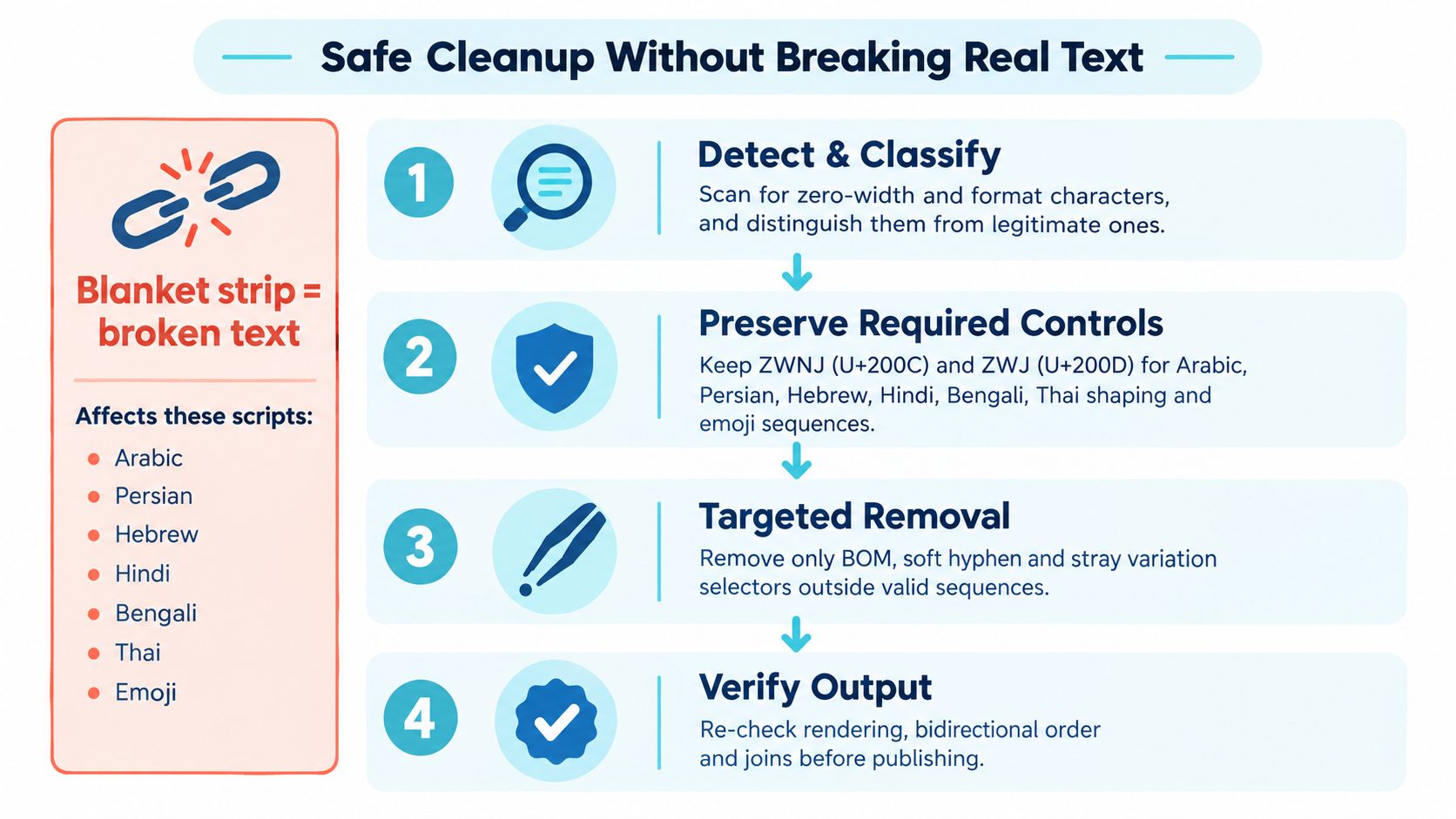
Final check: Render the cleaned text in the target application, verify bidirectional order, test search and comparison behavior, and preview emoji and multilingual text on the devices your readers use.
Don't treat cleanup as a fire-and-forget replacement. A copy-safe result has three properties: the unwanted code points are gone, required controls remain, and the output behaves correctly after the next copy and paste.
Simple Unmark combines invisible-character scanning with text cleaning and rewriting aimed at reducing probabilistic watermark signals while preserving meaning, facts, numbers, proper nouns, tone, and intent. If you need to inspect and clean pasted AI text in one workflow, visit Simple Unmark and test the output before publishing or submitting it.
- invisible character copy
- zero width space
- unicode cleanup
- remove hidden characters
- copy paste text
More posts
AI Detection Bypass Tool: The Honest Truth
Discover how an AI detection bypass tool actually works. Learn about watermarks, detector flaws, and how to clean text responsibly without losing meaning.
How to Rewrite AI Generated Text Without Losing Meaning
Learn how to rewrite AI generated text while keeping facts, tone, and intent intact. Practical steps, tool workflows, and tips to reduce watermark signals.
10 AI Paraphrase Tool Free Picks for Better Rewrites
Compare 10 ai paraphrase tool free options by features, limits, use cases, and drawbacks, plus when Simple Unmark is the better cleaning choice.