
How to Clear Copy and Paste Text Without Losing Meaning
Learn how to clear copy and paste text by removing hidden formatting, invisible Unicode, and AI watermark signals while keeping meaning intact.
You copy a clean-looking paragraph from a browser, paste it into a document, and the formatting falls apart. Lines wrap in the wrong places, bullets shift, odd gaps appear, and text that looked ordinary suddenly behaves strangely. The problem isn't always visible formatting. Pasted text can carry hidden Unicode, structural leftovers, and statistical signals from AI generation.
If you want to know how to clear copy and paste text without losing meaning, use a controlled workflow. Strip what doesn't belong, inspect what remains, rewrite only where necessary, and compare the result with the original before you publish or send it.
Table of Contents
- What Actually Hides in Pasted Text
- The Paste Clean Copy Workflow That Works
- Why AI Watermarks Need More Than a Find and Replace
- Using Simple Unmark for Faster Cleanup
- Keeping Meaning Facts and Tone Intact
- Troubleshooting When Cleanup Goes Wrong
- When Cleaning Is Worth It and When to Skip It
What Actually Hides in Pasted Text
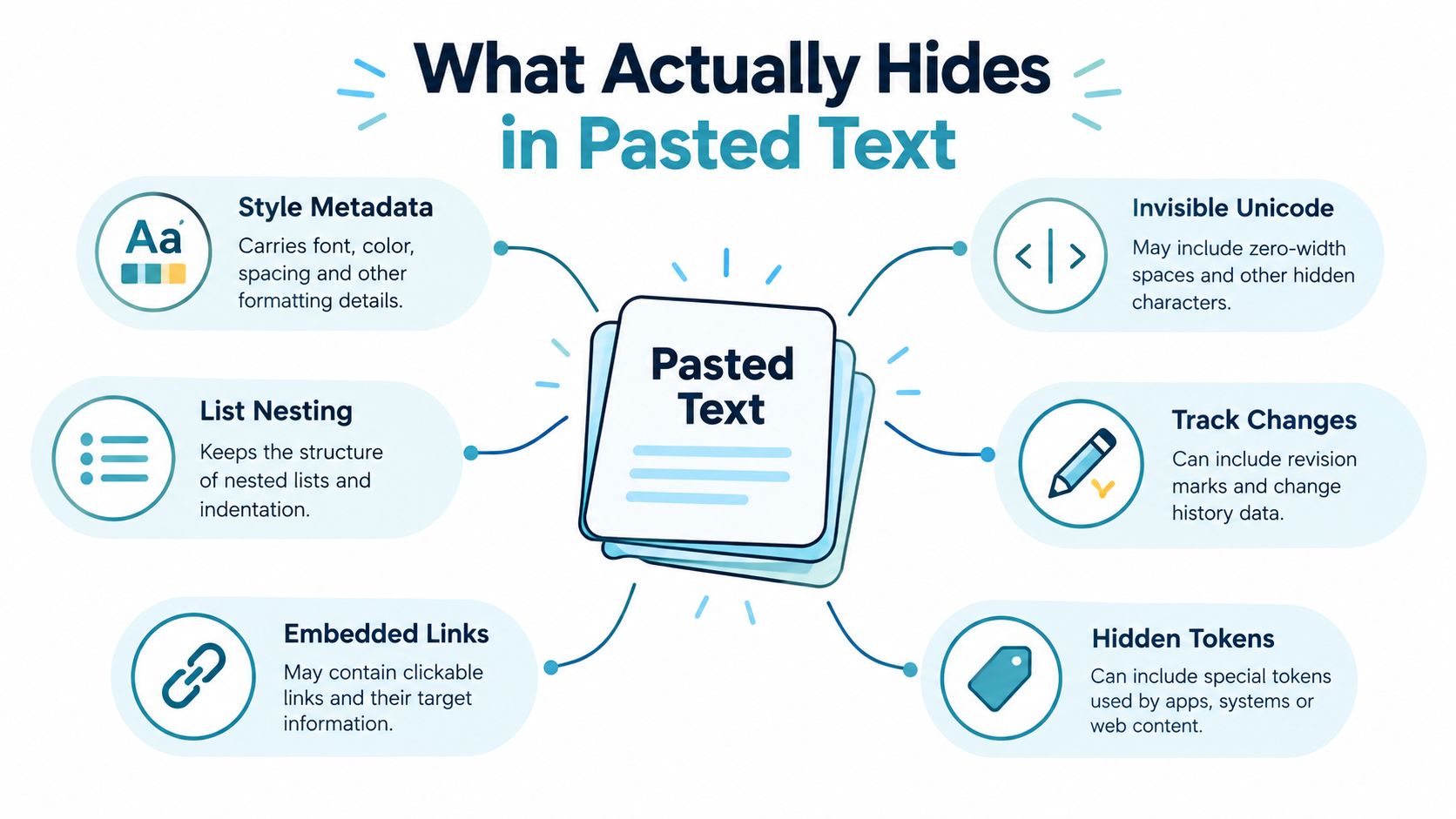
Pasted text is a layered object, not just words on a screen. A browser or word processor may carry fonts, colors, spacing, list nesting, embedded links, comment anchors, smart tags, and tracked-change residue inside the copied HTML. The destination may ignore some of that data, interpret it differently, or preserve enough of it to disrupt the layout.
Invisible Unicode creates a separate problem. A zero-width space, U+200B, can affect line breaking even though you can't see it. Zero-width joiners and non-joiners, soft hyphens, bidirectional marks, word joiners, and narrow no-break spaces can also survive ordinary visual inspection. Invisible copy-paste characters are real non-printing code points commonly encountered in text copied from web editors, CMSs, and browsers.
Check the layers before deleting anything
Use this quick inventory:
- Style metadata: Fonts, colors, indentation, line spacing, and list hierarchy can travel with rich-text content.
- Structural noise: Tables, comments, revision markers, and editor-specific anchors may remain hidden in the copied source.
- Invisible Unicode: Zero-width characters and directional controls can change breaks or display order.
- Terminal or interface chrome: Symbols, prompts, hard wraps, and status text can become ordinary characters after copying.
- Embedded links: A visible phrase may carry a destination URL you didn't intend to preserve.
- Statistical signals: AI-generated text can contain token-selection patterns that aren't searchable as words.
A normal find-and-replace catches only deterministic text. It won't reveal every code point, remove HTML metadata, or address a statistical pattern distributed across many token choices. For broader text cleanup techniques, start with inspection rather than blind deletion. You can also run suspicious passages through an invisible character remover before rebuilding the formatting.
The Paste Clean Copy Workflow That Works
Don't paste questionable text directly into a rich-text field. Start with a plain-text editor or a dedicated cleaner. That neutral target removes much of the styling baggage and gives you a stable version to inspect.
Use six controlled steps
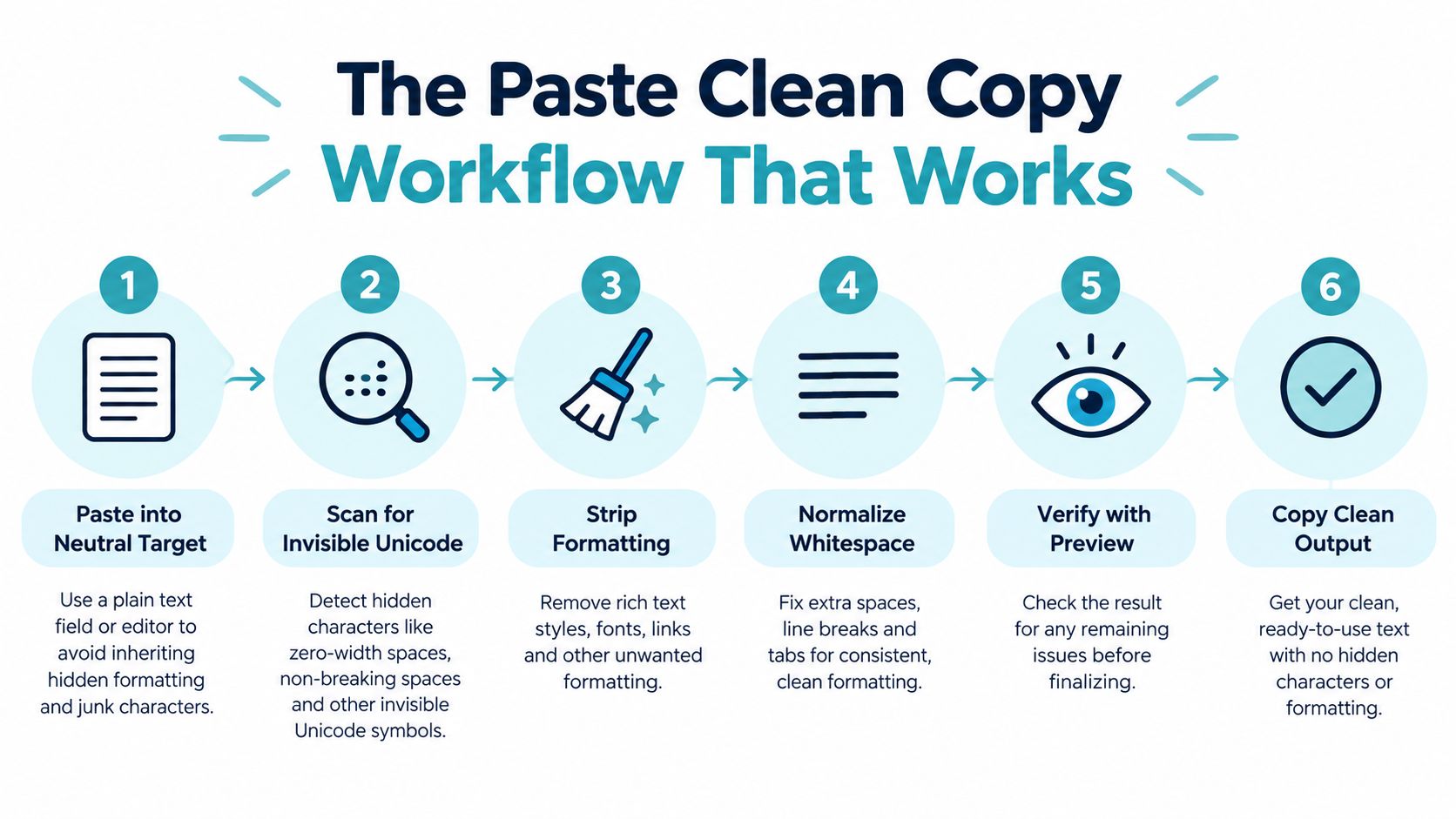
Paste into a neutral target. Use a plain-text editor or text-analysis tool. This separates the words from the source's fonts, colors, and layout rules.
Scan invisible Unicode. Open a character inspector and review counts by category. Look for zero-width spaces, bidirectional controls, soft hyphens, unusual spaces, and other non-printing characters. A detector workflow that shows character groups and cursor behavior makes suspicious passages easier to verify, as described in this invisible-character detection guide.
Strip formatting and targeted hidden characters. Remove only the code points that are present. Don't delete every unusual character by default. Unicode guidance recommends preserving characters that affect emoji or script shaping, then comparing the output before using it elsewhere.
Read the result aloud. Your voice catches split words, missing punctuation, broken hyphenation, and awkward line joins faster than visual scanning.
Copy as plain text. Copy from the cleaned buffer, then use paste-as-plain-text in the destination. Let the destination rebuild its own styling instead of importing the source's formatting.
Diff the original and cleaned versions. Check word count, numbers, dates, proper nouns, bullets, and named entities. Compare before and after output, then test the cleaned text in the target system.
For a typical passage, this routine should take less than 30 seconds when the right tools are already open. Don't over-clean. Diacritics, curly quotes, em dashes, emoji joiners, and script-shaping characters can carry meaning or affect display. Remove the exact unwanted characters, not every character you don't immediately recognize.
Why AI Watermarks Need More Than a Find and Replace
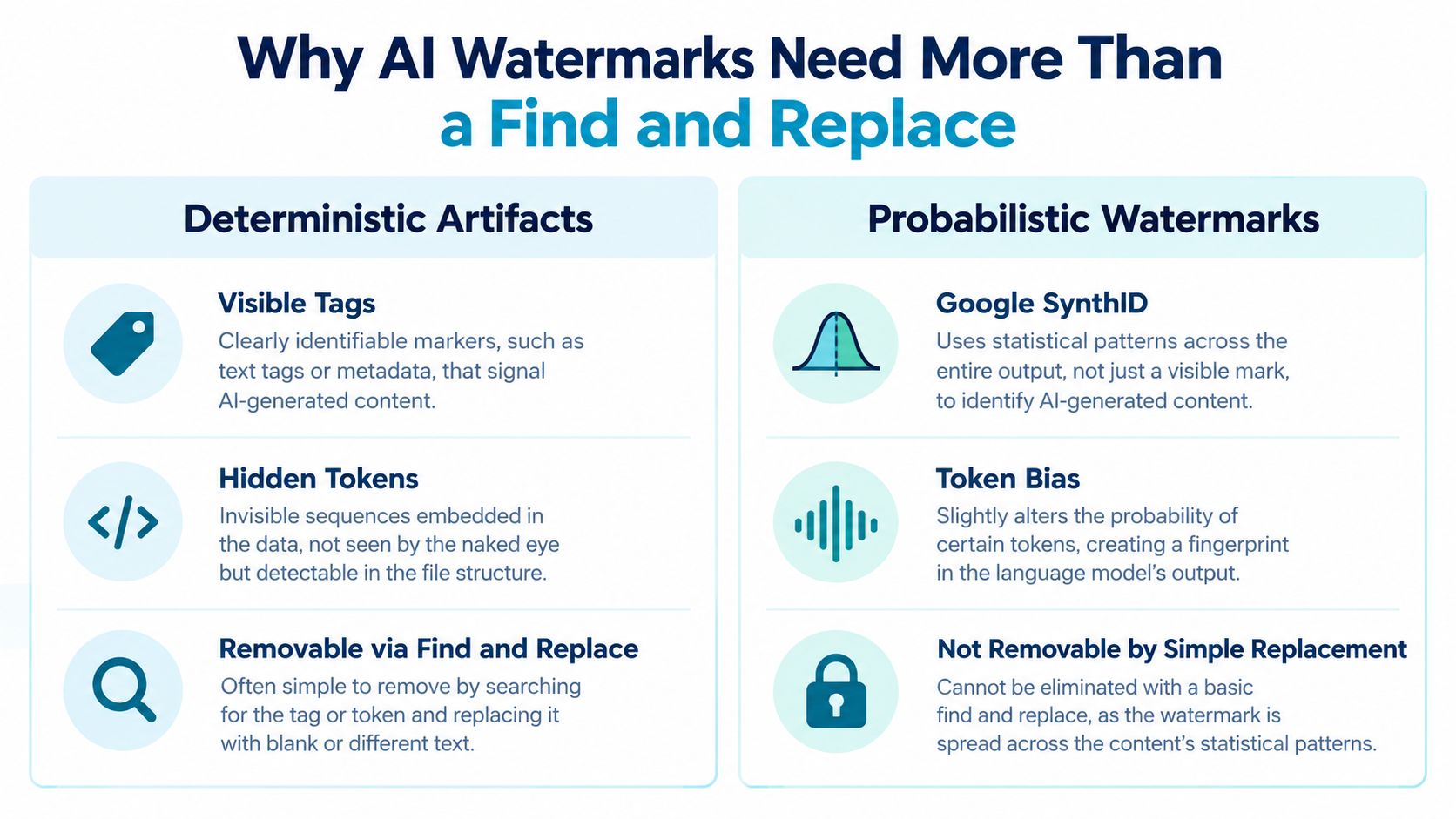
A pasted passage can look clean while retaining a statistical watermark. Invisible characters are deterministic: if the text contains U+200B, you can locate that code point and remove it. A statistical watermark spreads through token-selection patterns, so no searchable string identifies it.
Google DeepMind described SynthID-Text in 2024 as a watermarking system for large language model text. It changes token-selection probabilities during generation instead of inserting a visible tag. Google later expanded SynthID to text generated in the Gemini app and web experience. The 2024 Nature paper on SynthID-Text describes a system designed to remain imperceptible to readers while staying detectable by its watermarking method.
Scrubbing zero-width spaces will not alter that probability pattern. Replacing only the words a detector flags is also poor practice. It can distort the meaning and leave the wider pattern untouched.
Rewrite the passage at sentence level while protecting its information. Vary sentence length, replace predictable wording with natural alternatives, reorder clauses only when cause and effect remains clear, and break repeated rhythms across neighboring sentences. Random synonym swaps are too shallow.
Research supports this approach. A 2025 study found that, under a copy-and-paste attack with a length ratio of 10, SynthID-Text's F1 score fell to 0.788 and its false-positive rate rose to 0.53. A 2026 empirical paper reported that meaning-preserving paraphrase eliminated watermark detection in 98.3% of initially detected SynthID texts, with a 5.4% false-positive rate on clean text. The findings appear in the research on meaning-preserving attacks against SynthID-Text.
Lock every cited fact, number, date, proper noun, and conclusion before rewriting. The difference between hidden Unicode and statistical watermarks determines whether character scrubbing, rewriting, or both belong in your cleanup.
Using Simple Unmark for Faster Cleanup
A pasted passage can need two different treatments: remove hidden characters, then rewrite wording that may carry a statistical watermark. Simple Unmark keeps both jobs in one working buffer. Paste the source into the editor, run the scrub, review the changes, and only then send the text to a CMS, document, email, or publishing platform.
Start with one-click cleanup. It removes detected zero-width spaces, soft hyphens, and bidirectional control characters before they cause display or line-break problems. Speed helps, but review decides whether the result is safe to publish.
Compare the original and cleaned versions in the side-by-side diff. Check list nesting, punctuation, code strings, line breaks, and named entities. A missing character in an identifier, a changed curly quote, or a split paragraph can alter the finished text.
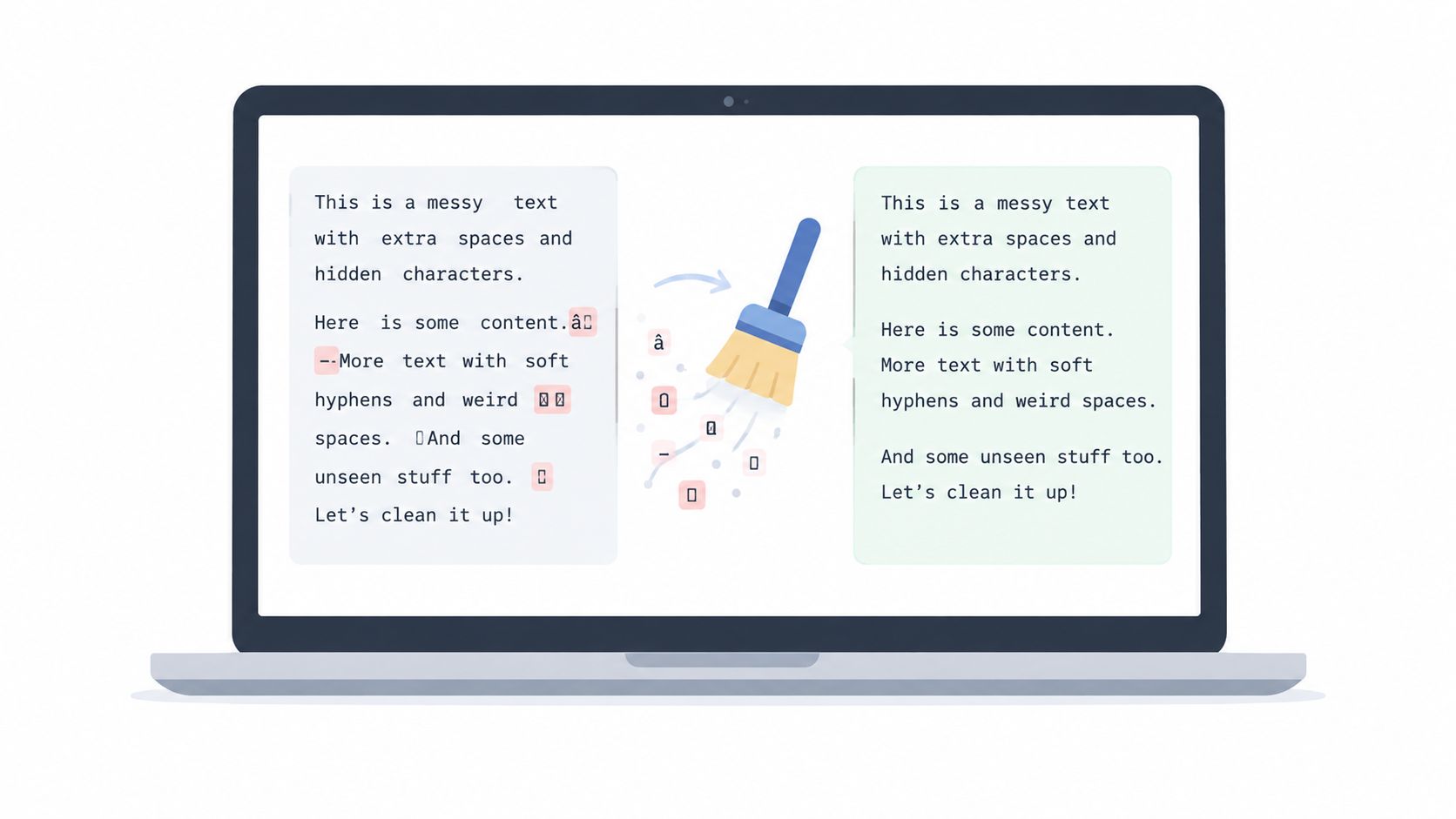
Run the watermark scan after the Unicode pass. It checks statistical signals, including unusual token-probability patterns, that visual inspection cannot expose. If only certain sentences are flagged, rewrite those sentences in the rephrase panel and leave the surrounding copy alone. Rewriting matters as much as scrubbing when the goal is to address probabilistic AI watermarks without flattening the passage's tone.
Finish with the clipboard button that bypasses formatting. Paste into the destination, then inspect the rendered result. The Simple Unmark editor combines character cleanup, targeted rewriting, review, and copying in one workflow.
Keeping Meaning Facts and Tone Intact
A passage can look clean and still say something different. Before rewriting, make a short fact sheet with every name, product version, statistic, date, citation, quoted phrase, and technical term that must survive unchanged.
Start with the sentence that needs work, not the whole paragraph. Full-paragraph rewrites often remove concrete details, soften emphasis, and flatten the writer's tone. Change one sentence, then compare it with the source before touching the next.
Protect these elements during every edit:
- Numbers and units: Confirm that values, percentages, measurements, and units remain accurate.
- Proper nouns: Keep company names, product names, people, locations, and version labels exactly as written.
- Citations and quotes: Preserve quoted wording and attribution.
- Cause and effect: Check that a reordered clause has not reversed what caused what.
- Tone and intent: Match the original formality, confidence, urgency, and audience.
Rewriting matters as much as scrubbing when you are addressing probabilistic AI watermarks. Change predictable phrasing without changing the claim. A plain verb can replace a fashionable expression, but do not turn “removed” into “reduced” or “investigated.” That shifts the evidence.
Editing rule: Rewrite the surface pattern. Keep the evidence intact.
Finish by checking the revised passage against your fact sheet. Verify every number, proper noun, citation, and conclusion. If you cannot explain the exact change, restore the original sentence and make a narrower edit. This protects meaning, facts, and tone while giving the text a rewritten surface.
Troubleshooting When Cleanup Goes Wrong
Cleanup can introduce new damage. Removing soft hyphens may expose unwanted line breaks. Deleting bidirectional controls can disrupt a list or alter how mixed-direction text displays. Replacing smart quotes with straight quotes can break code, stored strings, or carefully edited prose.
Aggressive zero-width removal is another common mistake. Some joiners and non-joiners support emoji or script shaping, so restore lost characters from the diff view instead of retyping them from memory. The Unicode cleanup guidance recommends scanning first, removing exact code points, comparing output, and testing the result in its destination.
Treat detector results as signals
A detector score isn't a verdict. Research and independent evaluation report that SynthID-Text can be detected, while meaning-preserving paraphrase, copy-paste modification, and back-translation can reduce detectability. Independent analysis of SynthID probing also discusses how spoofing attempts can leave clues.
If a cleaned passage still receives a high AI-detector score, don't immediately rewrite everything. Common topics and predictable structures can produce similar signals in human-written text. Recheck the facts, inspect the diff, and make a focused structural edit only where the evidence supports it.
When layout problems persist, paste into a plain-text editor first. If the content looks correct there, import it into the destination and rebuild the styling from scratch.
When Cleaning Is Worth It and When to Skip It
Use a simple filter. Cleaning is worthwhile when pasted text contains visible formatting glitches, hidden zero-width characters, or a known watermark pattern that creates a provenance concern. It makes practical sense for client deliverables, published articles, resumes, and important emails, where presentation and source handling matter.
Skip the process for internal notes, quick replies, code snippets, or text entering a system that already strips invisible characters during paste. Don't spend time cleaning your own original writing when you'll retype or restructure the entire document anyway. In that situation, rewriting has already replaced scrubbing.
Stop if cleanup demands changes to numbers, proper nouns, or cited quotes. Forced edits can corrupt facts faster than a detector result can embarrass you. Preserve the source, narrow the change, and verify the output.
Detectors remain imperfect, and cleanup reduces a signal rather than guaranteeing invisibility. The useful goal is simpler: produce text that is cleaner, clearer, factually intact, and safe to paste.
Simple Unmark removes hidden Unicode and applies targeted rewrites to reduce statistical watermark signals while preserving facts, numbers, proper nouns, tone, and intent. Visit Simple Unmark to paste, inspect, clean, and copy your next passage without rebuilding the workflow by hand.
- copy and paste cleanup
- remove hidden formatting
- AI watermark remover
- invisible Unicode
- paste clean copy
More posts
10 Paraphrase Tool Online Options Compared
Compare 10 paraphrase tool online options by features, pricing models, use cases, rewrite fidelity, and limits, including Simple Unmark.

10 AI Tools for Content Creators in 2026
Compare 10 AI tools for content creators, from writing and research to video and text cleanup, with use cases, trade-offs, and pricing guidance.
AI Watermark Explained: How Detection Works and Fails
Learn how AI watermark detection works, why it often fails, and what writers and editors should realistically expect from tools like SynthID in 2026.