
How to Remove Watermarks from AI Text in 2026
Learn how to remove watermarks from AI text honestly. Covers SynthID, hidden Unicode, and practical rewriting methods with clear limits and verification steps.
Most advice on how to remove watermarks from AI text starts with the wrong assumption. It treats every watermark as hidden junk that you can delete with find and replace. That works for invisible characters. It doesn't work for statistical signals spread across an AI model's word choices.
Those are different problems, with different fixes and different limits. Clean the string when the issue is Unicode. Rewrite the passage when the issue is a probabilistic signal. And don't trust any vendor promising permanent, guaranteed undetectability. Current research shows that rewriting can reduce detection sharply, but detector outcomes remain probabilistic and can change with the text, model, and test configuration.
Table of Contents
- Two Watermark Problems Hidden Behind One Question
- A 60-Second Triage Before You Touch Anything
- Cleaning Invisible Unicode the Right Way
- Removing Probabilistic Watermarks Through Rewriting
- What Tools Can and Cannot Promise You
- Legal and Ethical Boundaries You Should Know
Two Watermark Problems Hidden Behind One Question
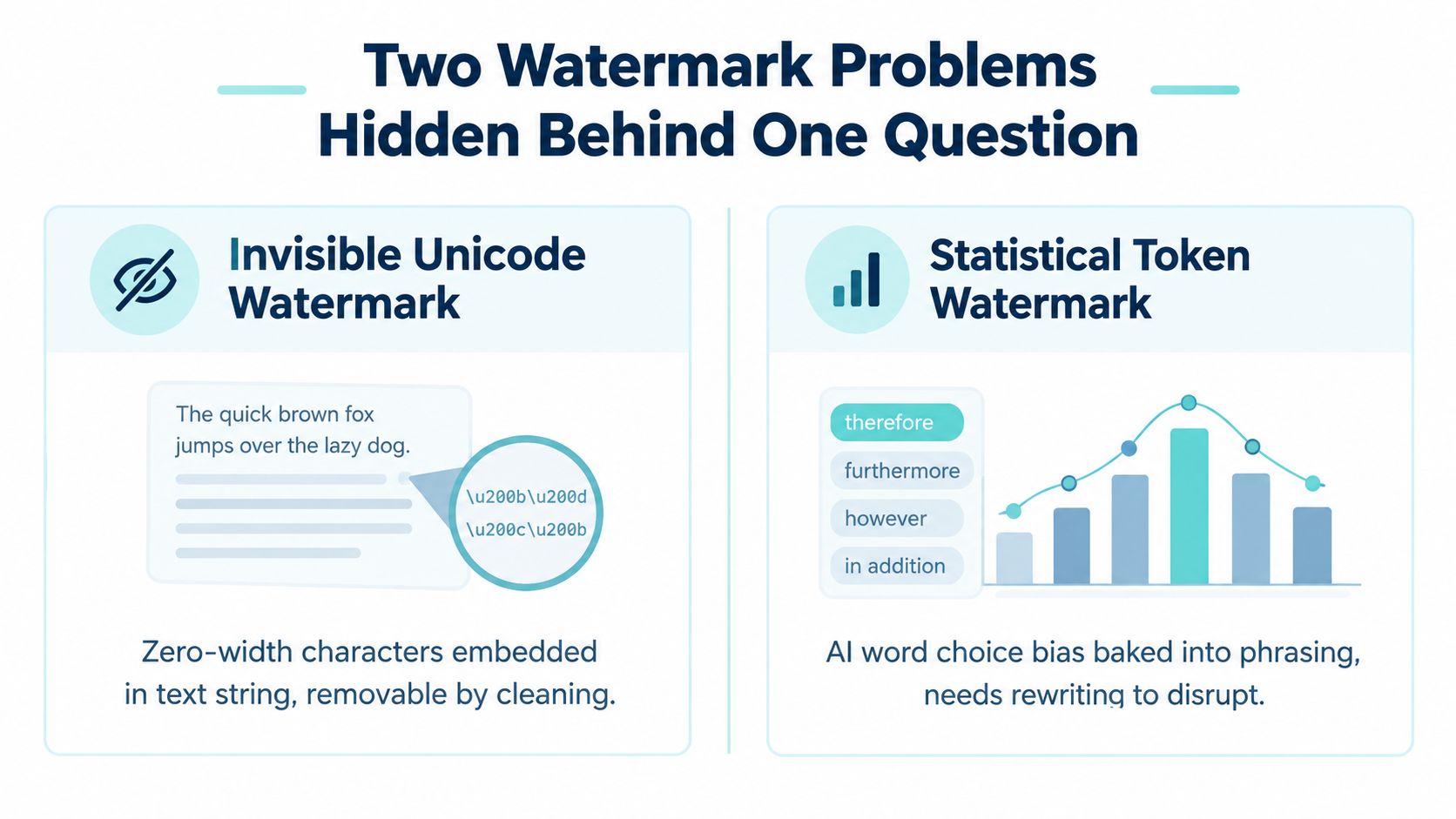
There are two unrelated things people call an AI watermark.
The first is invisible Unicode. A pasted passage may contain zero-width characters, bidirectional controls, a byte-order mark, or unusual spacing code points. These characters don't display a visible glyph, but they remain part of the string and can interfere with parsing, search, copy-paste behavior, and string comparison, as documented in this overview of invisible Unicode characters.
The second is a statistical text watermark. Systems such as Gemini's SynthID-Text influence token selection during generation. The signal isn't sitting in one hidden character. It's distributed through patterns of word choices, so deleting characters won't touch it. Research on SynthID probing makes the distinction plainly: statistical watermarks require rewriting, not character-level cleanup.
The practical difference
Unicode cleanup is deterministic. Find the unwanted code points, remove them, and verify that the visible text stayed intact. A competent text editor, script, or dedicated cleaner can handle this.
Statistical cleanup is adversarial. You must change enough phrasing and sentence structure to disturb the token-choice pattern while preserving meaning. Even then, you haven't proved that every detector will return a clean result.
A peer-reviewed analysis tested recursive paraphrasing on 300-token passages. At a 1% false-positive rate, detector true-positive rate fell from 99.8% to 9.7% after five rounds, while perplexity increased by about 1.5, indicating only modest measured quality degradation. The same analysis found that one paraphrase round reduced detection to 80.7% with one paraphraser and 54.6% with another, while performance fell below 20% after five rounds. See the peer-reviewed analysis of recursive paraphrasing and watermark detection.
Practical rule: If you haven't identified the watermark type, you don't yet know which tool to use.
For a concise comparison of both categories, see this guide to hidden Unicode versus statistical watermarks. The distinction prevents the most common mistake, removing harmless formatting artifacts and assuming the model-level signal has gone too.
A 60-Second Triage Before You Touch Anything
Don't rewrite a passage before checking whether there's anything to rewrite. A quick triage tells you whether you're dealing with dirty text, a detector result, or both.
Step one, inspect the actual string
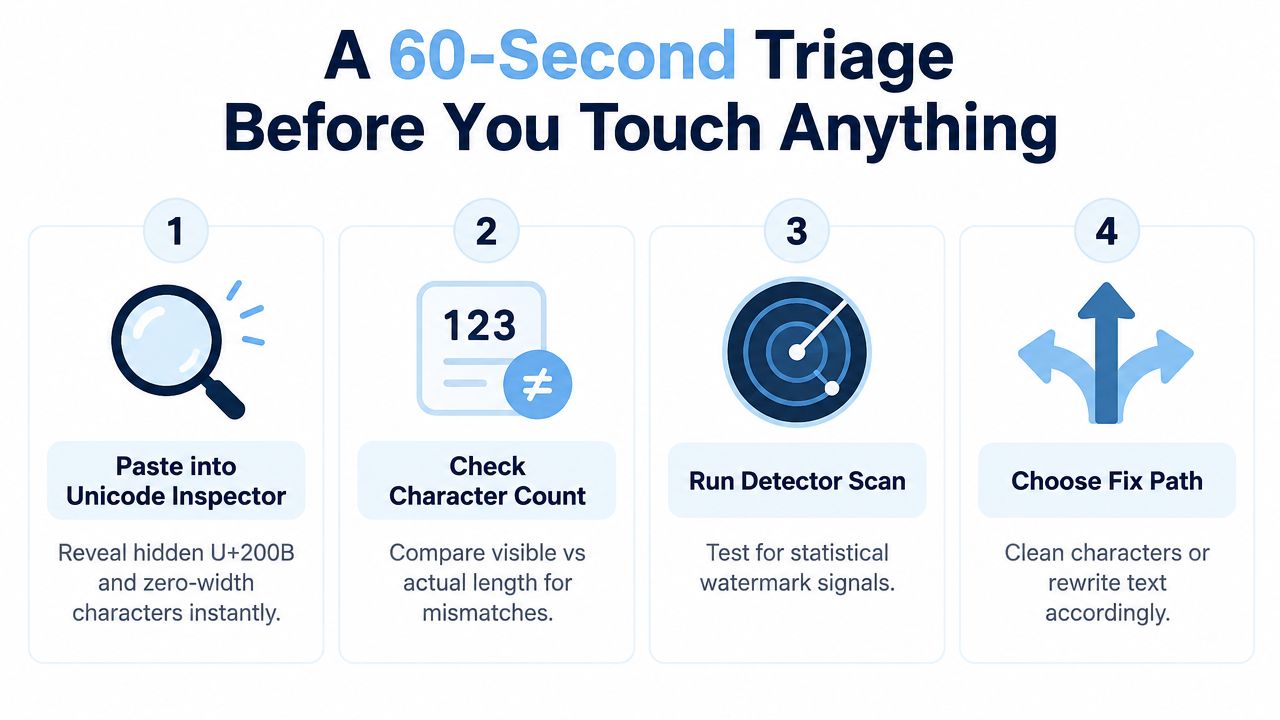
Paste the text into a Unicode Inspector. If you're working in a terminal, search for the specified range with this pattern:
[\u200B-\u200F\u2028-\u202F\u2060-\u206F\uFEFF]
That range catches common zero-width, formatting, directional, and related characters. Check whether the inspector finds anything and compare the visible character count with the underlying string length.
Step two, run a detector
Use a detector such as GPTZero or Originality.ai on the untouched passage. Treat the result as a signal, not a verdict. A detector can flag clean human text, and a clean result doesn't establish who wrote the passage.
Step three, choose the branch
Use the outcome, not the label someone gave the file:
- Hidden characters found: Clean the Unicode first. Don't paraphrase unless you have a separate reason.
- No hidden characters, detector signal appears: Treat it as a possible statistical watermark or an ordinary detector false positive. Move to controlled rewriting only if the purpose is legitimate.
- Both appear: Remove the Unicode artifacts, preserve the original, then assess whether the detector result changes. If it doesn't, the remaining issue is probabilistic.
- Neither appears: Stop. More processing can reduce quality without solving a real problem.
This triage matters because invisible Unicode removal is exact and inspectable. Statistical watermark reduction isn't. You can verify the first by examining code points. You can only compare detector behavior for the second.
Cleaning Invisible Unicode the Right Way
Invisible Unicode cleanup is the easy case, but careless removal can still damage legitimate text. Work from a copy, preserve the original, and remove only characters your workflow identifies as unwanted.
Common artifacts include the zero-width space, U+200B, zero-width non-joiner, U+200C, zero-width joiner, U+200D, soft hyphen, U+00AD, word joiner, U+2060, and BOM, U+FEFF. Some format controls may be intentional in multilingual text, so don't delete every non-printing character blindly.

Pick the simplest safe path
For developers, use a targeted regular expression. The range above is a reasonable starting point for common artifacts, but inspect the match list before deletion. A broad “remove all control characters” rule can alter line breaks or language-specific behavior.
For non-technical users, utilities such as UnhideCharacters and BabelPad make hidden marks visible. Reveal the code points, select the unwanted characters, remove them, and export or copy the cleaned result as plain text. A visual editor is safer than blindly pasting content into an unknown online form when the material is confidential.
For batch processing, use Python's unicodedata module. Build an explicit allowlist of characters to remove, rather than assuming every character with a control category is malicious. That gives you an auditable process and lets you preserve intentional formatting.
Verify before publishing
Re-run the Unicode inspector after cleaning and confirm that the targeted character count is zero. Then compare the cleaned output with the original in a hex viewer or another byte-aware diff tool.
The visible text should remain unchanged. Check headings, punctuation, line breaks, non-Latin text, links, and copied identifiers. If any visible content changed, restore the original and narrow the cleanup rule. A dedicated invisible character remover can speed up this workflow, but verification still belongs to you.
Unicode cleanup doesn't remove a statistical watermark. It only removes characters that were present in the string.
Removing Probabilistic Watermarks Through Rewriting
Probabilistic watermark removal is not a matter of deleting visible characters. The signal can sit in token selection, phrasing, rhythm, and recurring continuation choices. You cannot identify the marked words by inspecting the text, so replacing a few synonyms rarely works. Treat this as controlled rewriting, not cosmetic editing.
Start with a baseline
Run the untouched passage through the detector or detectors you are evaluating. Save the exact text, result, date, and available detector settings. Without that record, you cannot distinguish a useful rewrite from a change in the detector's judgment.
Then create a deep, meaning-preserving paraphrase. Change sentence structure, clause order, transitions, rhythm, and word choice. Preserve facts, numbers, proper nouns, legal qualifiers, and the writer's intended conclusion.
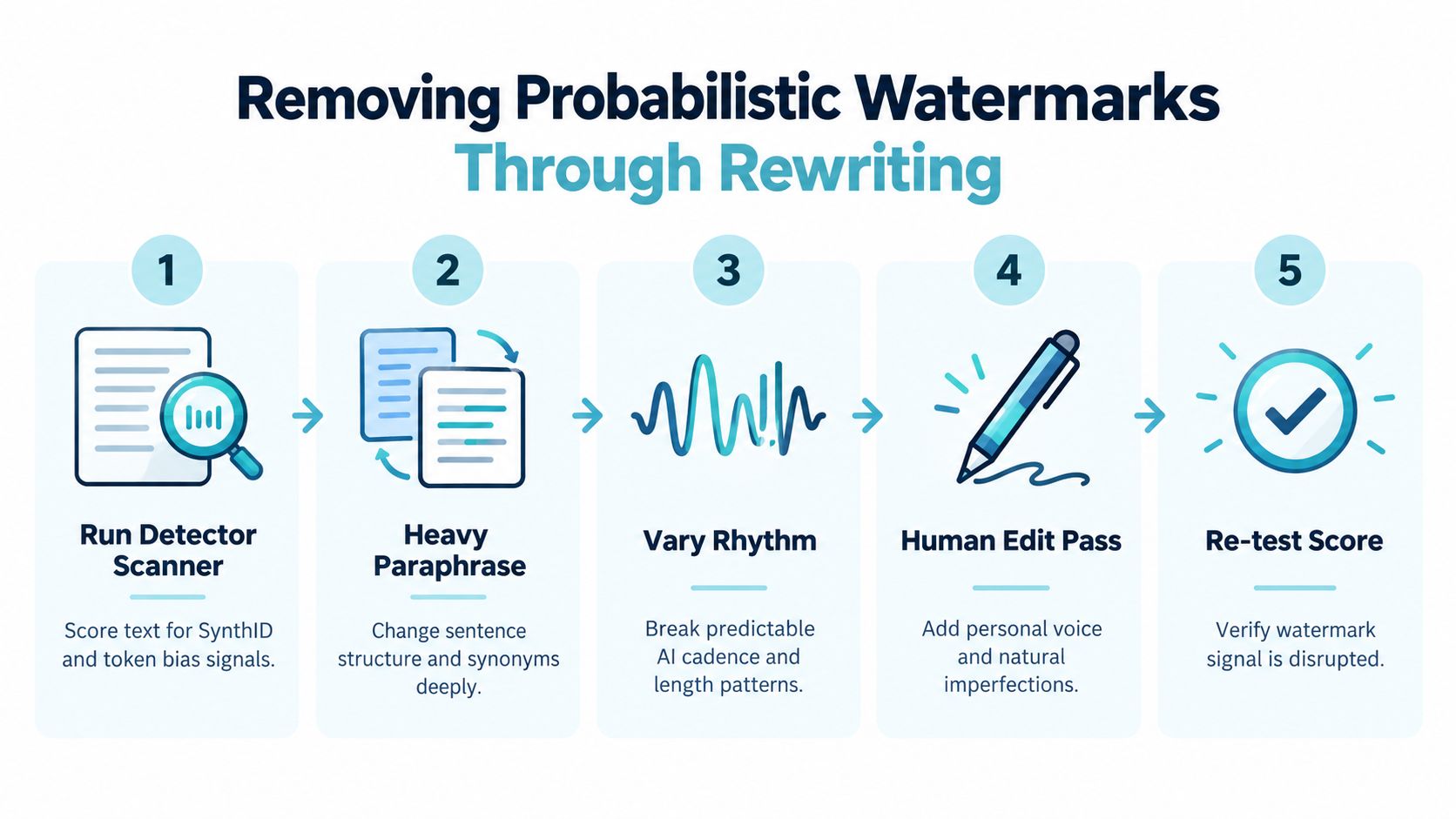
Use a controlled rewrite pipeline with an AI watermark remover, followed by human review:
- Confirm the signal. Run a baseline scan before editing.
- Paraphrase. Use a capable model or humanizer, with a temperature floor above 0.7 if that control is available.
- Change cadence. Mix sentence lengths, remove repetitive transitions, and break predictable paragraph patterns.
- Edit manually. Rewrite roughly 10% of sentences, especially those with templated or highly predictable phrasing.
- Re-test and compare. Use the same detectors again, check perplexity dispersion, and keep a side-by-side scoring report.
The temperature and sentence-editing figures describe an operational workflow, not verified performance guarantees. They are choices intended to create broader wording variation. Test them against your own material.
Why one pass often fails
A single paraphrase may retain the same common synonyms and sentence skeleton. Enough of the original token pattern can survive. Research on recursive paraphrasing found detection falling sharply as paraphrase depth increased, supporting iterative rewriting over superficial token swaps.
A separate 2026 study of SynthID and related schemes reported that meaning-preserving paraphrase eliminated detection in 98.3% of initially detected SynthID texts, with a 5.4% false-positive rate on clean text, under its stated experimental configuration. Independent probing of SynthID-Text also reported scrubbing success rates above 90% for naive adversaries using off-the-shelf paraphrasers when context size, tournament sampling, and caching were increased. The SynthID and watermark scrubbing study explains those conditions and limitations.
These findings do not support a universal bypass claim. Longer passages may still trigger detectors, model families can respond differently, and detectors can flag clean text before editing. Use a humanizer for rewriting, a perplexity checker for supporting analysis, and a side-by-side report for comparison.
The honest success metric is reduced detector confidence, not zero.
Validate every pass like an editor. Compare numbers, names, quotations, technical terms, and instructions against the source. If the rewrite becomes less accurate or no longer sounds like the intended author, it failed, even if the detector score dropped.
What Tools Can and Cannot Promise You
Tools can remove invisible Unicode reliably because the task is string surgery. They can identify a zero-width character, delete it, and let you verify the result. Statistical watermarks are different. The signal is probabilistic, may depend on the model family and attack type, and is designed to be detected from patterns rather than a visible marker.
That makes absolute vendor claims a credibility test. If a product promises 100% bypass, guaranteed invisibility against future detector versions, or permanent protection from enterprise classifiers, treat the claim as fiction.
Read the claim beside the mechanism
| Claim | Unicode Watermarks | Probabilistic Watermarks |
|---|---|---|
| “Remove it instantly” | Plausible when the tool identifies and deletes specific code points | Misleading, because rewriting is required |
| “No visible change” | Testable with a character and byte-level diff | Not guaranteed, because semantic rewriting can change tone or meaning |
| “Works against every detector” | Mostly irrelevant to deterministic cleanup | Not credible without a defined corpus, detector, and test method |
| “Guaranteed undetectable” | Excessive marketing | False certainty |
A sensible vendor should publish its methodology, explain what it changes, and state what it can't control. Look for a test corpus, detector conditions, preservation checks, and an explanation of whether text is stored. Be suspicious of missing methodology pages, no test corpus, and refund policies tied to detector scores rather than output quality.
For strategic context, the managing partner AI visibility guide is useful because it separates surface-level tool outputs from the broader questions teams should ask about AI visibility and evaluation.
What a practical tool should do
A useful workflow should scan for hidden characters, rewrite statistical patterns rather than swap a few words, preserve facts and proper nouns, and give you the cleaned text for review. It should also let you keep the original and compare outputs.
Simple Unmark is one option in that category. Its web app combines invisible-character cleanup with rewriting intended to reduce probabilistic signals, including SynthID-style patterns, while preserving meaning, facts, numbers, proper nouns, tone, and intent. That's a workflow aid, not proof that every detector will return a clean result.
The right buying question isn't “Can this guarantee removal?” Ask instead: What exactly does it remove, what does it rewrite, how does it verify preservation, and what evidence supports its claims?
Legal and Ethical Boundaries You Should Know
Watermark removal isn't automatically misconduct, and watermark presence isn't proof of misconduct. Invisible Unicode characters can enter text through copying, formatting, accessibility tools, or ordinary processing. Removing artifacts you didn't add from a document you own is usually a cleanup task, not an attempt to deceive anyone.
The ethical line appears when the purpose changes. A student who launders AI-written work to submit it as their own has violated an academic rule whether the text contains a watermark or not. An employee who conceals prohibited AI use may breach an internal policy. A publisher may have disclosure requirements for AI-assisted material, and platform terms for ChatGPT, Claude, and Gemini may restrict deceptive or abusive uses.
A detector is evidence, not authorship proof
Detector output is a classification signal. It isn't a chain of custody, an authorship record, or a reliable answer to who wrote the passage. The reported 5.4% false-positive rate on clean text in the 2026 SynthID-related study is a concrete reminder that clean text can be flagged under a particular test setup. Watermark removal doesn't fix that weakness. It only changes the text being tested.
Don't use a lower score as a clean bill of origin. If authorship matters, preserve drafts, revision history, prompts, source notes, editorial changes, and disclosures. Those records provide context that a detector score can't supply.
Platform and publication risks
An API provider can terminate an account for violating its terms. A school can reject work that violates its academic-integrity rules. A publisher can require disclosure even when no detector identifies the text. Regulatory duties may also depend on jurisdiction, sector, audience, and the final use of the material, including emerging European Union rules around AI transparency and labeling.
The safe operational policy is simple:
- Personal notes and accessibility: Cleaning copied text for readability or compatibility is reasonable.
- Editorial preparation: Remove hidden formatting artifacts, then disclose AI assistance when your publisher or client requires it.
- Research: Preserve the original, document every transformation, and report detector conditions.
- Assessment or employment: Don't use rewriting to misrepresent AI output as human-authored work.
- Public content: Follow the platform, client, publisher, and applicable legal requirements.
Removing a marker doesn't change the origin of the text, the policy governing its use, or your responsibility for what you publish.
Use cleaning tools for formatting hygiene and legitimate editorial work. Use rewriting to improve clarity and voice, not to manufacture a false authorship story. If you need a practical cleanup workflow, test the passage, preserve the source, validate the rewrite, and make the disclosure decision based on the context rather than the detector score.
Simple Unmark can remove hidden Unicode artifacts and rewrite text to reduce probabilistic watermark signals while preserving meaning, facts, numbers, proper nouns, tone, and intent. Try the paste, clean, and copy workflow at Simple Unmark, then compare the result with your original before using it.
- watermark removal
- AI text cleaning
- SynthID
- remove watermarks
- AI detection
More posts
Watermark Remover Online: What Works and What Doesn't
Compare watermark remover online options for AI text. See how rephrasing, Unicode cleanup, and token edits differ, plus where Simple Unmark fits.
How to Use Watermark Remover Without Losing Meaning
Learn how to use watermark remover tools to clean AI text quickly. Practical steps, settings, and honest tips for better results with Simple Unmark.
Invisible Numbers Explained and How to Remove Them
Learn what invisible numbers and hidden Unicode characters are, how they watermark text, and how to detect and remove invisible numbers safely.