
AI Data Privacy Guide: Who Can See Your Text
Learn how AI data privacy works: who can read pasted text, what gets stored, and how to limit exposure before you paste.
Most advice about AI data privacy points at a single switch: turn off model training. Flip it, the reasoning goes, and your text stops feeding the machine.
That switch is worth flipping, and it answers a narrower question than the one users often raise. Training decides whether your words shape a future model. It says nothing about whether a support agent reads the contract you pasted, whether a contractor sees a flagged conversation, whether your employer's admin console keeps the transcript, or whether a legal request reaches a log file.
The useful question is harder to answer than a settings toggle: who can see this text, and what record of it survives after you close the tab?
Table of Contents
- Who Can See the Text You Paste Into AI
- How Your Text Moves Through an AI Pipeline
- Why Encryption Does Not Make Text Anonymous
- How to Audit an AI Tool's Privacy Settings
- Consent Before You Paste Other People's Data
- Regulation Milestones That Change Data Handling
- Which Traces Stay in AI-Generated Text
- Set Your Privacy Rules Before You Paste Anything
Who Can See the Text You Paste Into AI
A project manager pastes a summary of a client contract into a chatbot and asks it to check the termination clause. The task feels private. The processing isn't. Six different parties can reach that text, and they don't all lose it when the conversation is deleted.
Start with the model provider, because a model can't answer what it can't read. Then hosting vendors and sub-processors, which handle the same text under contract. Then the human layer: abuse reviewers who read flagged conversations, quality reviewers who sample them, and workplace administrators who open a console and search employee chats. Beneath that sit backups and logs, kept for recovery and debugging. Above all of it sits legal process. A no-training promise is not a no-access promise, and that single distinction explains most of the confusion around AI data privacy.
| Party | Typical access | Does deletion remove it? |
|---|---|---|
| Model provider infrastructure | Reads text to generate output | Only once the retention window in the policy closes |
| Sub-processors and hosting vendors | Process text under contract | Only when the contract requires deletion, so check the sub-processor list |
| Human reviewers (abuse or quality review) | Read flagged or sampled conversations | Only if reviewed copies follow the same deletion schedule as the chat |
| Account administrators (workplace plans) | View chats or logs in the admin console | Only if the administrator deletes the record |
| Backups and logs | Keep copies for recovery or debugging | Not until the backup cycle expires, which usually outlasts the chat |
| Legal authorities | Can request records under valid legal process | No, a valid request reaches retained records |
The human rows carry the most weight, and they are the ones users ask about least. A reviewer who reads a flagged conversation, or an administrator who searches a shared workspace, creates an access event no encryption setting can undo. Pseudonymisation sits in the same territory: strip names, and the record still links back to a person through device signals, timestamps and account metadata. Three elements do the work there, a reversible mapping, a separation between the identifier and the data, and controls on who holds the mapping.
Users already price this distinction higher than the training question. A 2026 study found people valued avoiding human review at $11.20 a month, nearly four times the $2.97 they placed on preventing training use, while more than 80% reported concern about how conversation data is used and roughly 60% didn't know whether their assistant trains on conversations at all (arXiv study on how users value AI privacy). Only 18% had paid for a privacy-enhanced plan.
Records also outlive the tool. Account exports, shared links and assistant histories are what Digital Footprint Check's guide to online identities and ChatGPT examines, and they're the same artifacts an employer or a litigant would request. The exposure registers before policy catches up. Business and technology professionals noticed it early: 72% ranked generative-AI data privacy among their top three concerns in 2024, up from 22% in 2023, according to Deloitte's 2024 State of Ethics and Trust in Technology report.
One question separates a tool that protects you from one that only promises to. Ask who holds the keys to the record, not who holds the model.
How Your Text Moves Through an AI Pipeline
A 400-word client memo pasted into a cleaning tool for a Unicode pass and a rewrite makes six handoffs. Each is a place where a copy can exist, if only briefly, and whoever handles it at that moment can read it.
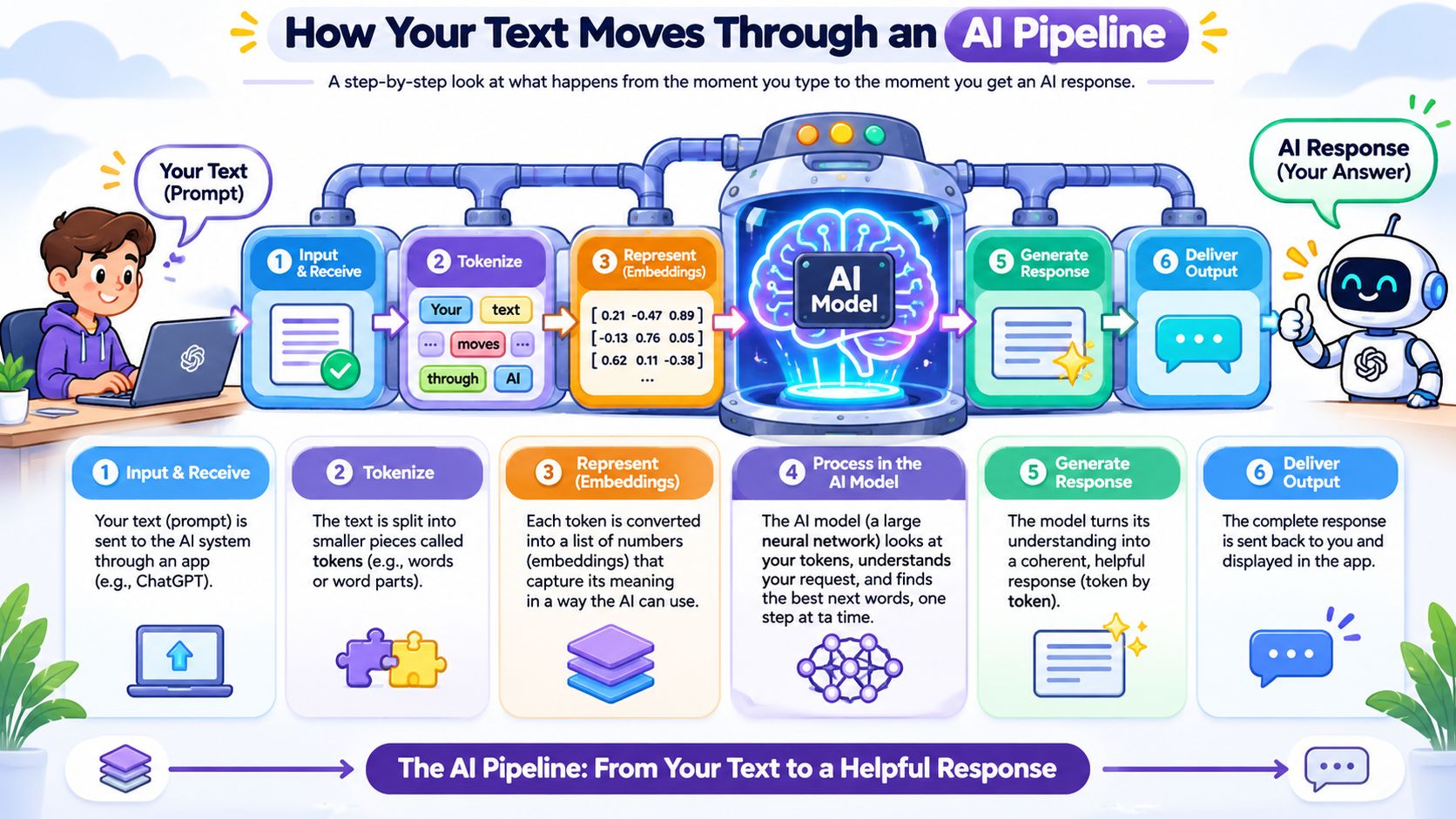
The diagram traces the sequence end to end. The stages below explain what happens to the text at each one.
Six handoffs from browser to copy button
- Browser to server. Your browser sends the text over HTTPS. The connection is encrypted, but the text is plaintext inside it, so whoever terminates that connection sees the memo.
- Load balancer. The request gets routed to an available worker. Routing metadata such as timestamps, sizes and status codes is logged routinely, and those logs describe your request without containing it.
- Application server. The app receives the plaintext and starts the job. Application logs at this layer are the usual reason a copy persists after a session ends.
- Python workload. Unicode cleanup runs here: zero-width characters, direction marks and odd spacing get stripped, and the rewrite gets prepared.
- AI provider. The rewrite happens at a third-party model provider, which reads the plaintext to produce new wording.
- Return to browser. The cleaned output comes back as copy-ready text. Anything the provider retained stays on its side.
Simple Unmark's Private mode is a useful worked case because its path is ordinary: the app, the ordinary HTTPS and load-balancer path, the Python workload, and DeepInfra all process plaintext text. Nothing exotic, nothing hidden. It is also the lowest-cost option, at 0.1 credit per started 100 words.
The cost math follows the block counting. A 400-word memo sits well past the guest allowance of three cleans of up to 100 words each, so it needs an account. Four started 100-word blocks at 0.1 credit each come to 0.4 credit in total. That figure is a total across four blocks. The coming-soon Confidential AI mode is the one priced at 0.4 credit per started 100 words, and it keeps cleaning and the rewrite inside a protected environment rather than sending text to an external provider.
Every handoff behaves like a courier. A sealed box protects the contents only while each courier respects the seal; one who opens it turns the rest of the journey into plaintext.
Practical rule: map every party that touches the text before pasting anything sensitive, and assume any stage you can't identify sees plaintext.
If the memo only needs line breaks tidied and invisible characters stripped, the plain text converter does that work locally in the browser and skips the pipeline entirely.
Why Encryption Does Not Make Text Anonymous
Encryption protects data from outsiders. Pseudonymisation swaps identifiers so records cannot be tied to a name without extra information. Anonymisation removes the connection to a person altogether. Three different promises, and only the third changes whether the text still identifies someone.
The usual pseudonymisation test has three parts: transform the personal data, keep the additional information needed for re-identification separate, and apply technical and organisational measures that prevent attribution to an identified or identifiable person. That standard also warns against leaving direct identifiers where they make attribution easy, and it expects controllers to define permitted disclosure, enforce access controls and secure APIs. Encryption and pseudonymisation can both leave the story inside the text intact, and a passage can retain statistical signals even when names are stripped (research on probing SynthID and Gemini APIs).
| Protection | What it protects | What it leaves exposed |
|---|---|---|
| Encryption | Text in transit and at rest | Anything a party holding the key, or receiving plaintext, can read |
| Pseudonymisation | The link between a record and a name | The names, account numbers or case details still sitting inside the text |
| Anonymisation | The possibility of re-identification | Nothing, when it holds, and a full paste rarely reaches that bar |
Simple Unmark's Confidential mode makes the line visible. The browser verifies Google Confidential Space and encrypts text to a key the workload created for one request, so the web backend receives no text at all. DeepInfra still performs the rewrite. The Confidential mode overview describes that boundary, and the provider doing the work still reads the text it rewrites. Confidential AI, with the model inside a confidential GPU, is coming soon and isn't available yet.
Two rules cover most of this. Remove direct identifiers before pasting, and treat encrypted or pseudonymised text as personal data whenever its context identifies someone.
How to Audit an AI Tool's Privacy Settings
Fifteen minutes and one throwaway conversation are enough to answer the operational questions a policy page usually dodges. Run these seven steps on any assistant you plan to use for real work.
- Find the training control and check its scope. Turn it off where the tool offers the option, then read whether it also covers conversations you already had. That boundary is where users may assume more protection than they have.
- Write down the retention window for chats, uploads and logs. A conversation that vanishes from your sidebar can persist in logs for a fixed period. Record the number and the page it came from, because retention claims move when interfaces change.
- Ask what triggers human review. Abuse monitoring, quality sampling and safety escalation are the usual three paths, and reviewed copies are frequently filed somewhere other than your chat history.
- Check administrator visibility on workplace plans. On business tiers, an admin console can expose chats and usage logs, so a work account is never a private channel by default.
- List the sub-processors and hosting regions. Transfers cross borders more often than users expect, and the list should be contractual rather than implied by a status page.
- Read the legal-request section and the jurisdiction behind it. The jurisdiction determines who can compel disclosure. A tool with no stated jurisdiction is a tool with an unknown disclosure path.
- Test deletion. Delete a test conversation, then check whether it disappears from history, from exports and from any shared link. This is the only step that produces evidence instead of promises.
Why generic policy language fails these questions
A 2026 audit of 1,531 community discussions and 4,994 user-expressed privacy concerns found 3,137 policy gaps. AI-specific features accounted for 36.6% of those gaps and awareness deficits for 40.7%, together 77.3% of the total (audit of AI privacy discussions and policy coverage). Long policies don't fix that. Sentences about processing data "to provide and improve services" don't answer what happens to a pasted prompt.
Trust in the claims has fallen alongside. Confidence that AI companies protect personal data dropped from 50% in 2023 to 47% in 2024, according to the Stanford University 2025 AI Index Report.
Simple Unmark answers the same seven steps in plain terms: text and output aren't stored in its database or analytics, and request records carry metadata such as content category, word counts and processing status rather than the text itself.
Run step seven before step one. A deletion test tells you more about a provider's practices than any settings page.
Consent Before You Paste Other People's Data
Two permissions hide inside one paste. The first is whether you may share the text with a processor at all. The second is what that processor may do with it afterward. Treat them like separate keys, because one does not open the other.
For client, employee, or patient data, establish the lawful basis or the person's consent before the text leaves your control, and record that decision where you can find it later. A recruiter pasting a candidate's CV into a chatbot must settle whether the candidate agreed to that processing. Accepting a provider's terms does not grant consent to human review, and it does not settle model training. Check each permission separately, and note whether a training opt-out reaches conversations created before the change. What often matters more than the training question is who can open the text inside the provider and what access records exist.
Consent must also be specific enough to describe the processing. If the material involves a persona or character, separate rules apply, such as the ExChat consent rules for personas.
Consent you cannot honour is only a sentence. When someone withdraws permission, you need a map of every place the text travelled: provider history, your exports, shared links. Build that map before the first paste.
Regulation Milestones That Change Data Handling
The useful question about the EU AI Act is which record you can produce when someone asks who saw a piece of text. Dates matter, but records matter more. Confidence in voluntary practice is thin: in 2024, 67% of respondents said stricter privacy regulations were needed for AI tools, according to Webroot's 2024 Generative AI Consumer Trends and Privacy Survey. Regulation (EU) 2024/1689 runs on a staged clock rather than a single compliance day.
It entered into force on 1 August 2024, and the obligations land in waves (European Commission AI Act timeline). The Commission's timeline schedules each stage.
| Date | Milestone | Data-handling consequence |
|---|---|---|
| 1 August 2024 | Regulation (EU) 2024/1689 enters into force | Starts the staged compliance timeline |
| 2 February 2025 | Prohibitions and AI-literacy duties apply | Certain AI practices are banned outright |
| 2 August 2025 | General-purpose AI model rules, governance and penalties apply | Documentation, oversight and enforcement duties begin |
| 2 August 2026 | Most provisions, including transparency rules, apply | Disclosure of AI use and data handling becomes enforceable |
| 2 August 2027 | Scheduled: Article 6(1) high-risk obligations apply | Risk management and data governance duties for high-risk uses in regulated products |
The 2 August 2026 stage is the broadest in the staged clock: most provisions, including transparency rules, apply then. Transparency duties attach to how AI use gets disclosed, and disclosure depends on knowing which data your systems touch. That is also where operational records start to matter more than the model-training question. A training opt-out tells you little if you cannot show who reviewed a document or which vendor processed it.
Consider a multinational HR team running an AI screening tool. Before each applicable date, that team has to document its data sources, publish a transparency notice candidates can understand, and show risk controls for the screening logic. Privacy policies written for a careers page do not satisfy any of those three.
A useful habit: keep a one-page obligations sheet per AI system, with the date each duty starts and the person who owns it.
The practical step is to identify which stages apply to your organisation and ask every vendor for a compliance statement that names them, plus the access records it keeps. Vendors that cannot map their product to a date have not done the work.
Which Traces Stay in AI-Generated Text
Pasted text carries three kinds of marks, and each one needs a different response. Mixing them up causes most of the bad advice in this area.
Hidden Unicode characters. Zero-width spaces, direction controls and non-breaking spaces are artifacts of formatting and copying. They're invisible, they break search and diff tools, and they say nothing about how the text was produced. A document can pick them up from a PDF export or a content management system.
Statistical watermarks. Google's SynthID Text embeds a watermark by changing how likely candidate tokens are during generation rather than inserting a visible character or fixed phrase (Google's SynthID Text documentation). The system scores possible tokens and uses that to steer selection while keeping the text's apparent quality. Detection works best on longer, varied responses, where many token choices let a statistical pattern accumulate, and it's less effective on factual answers where shifting token probabilities could harm accuracy. Google also notes that detector confidence can fall substantially after thorough rewriting or translation.
Visible phrasing and structure. Repetitive openings, uniform sentence lengths and stock transitions are what a reader notices. No cleanup tool fixes those; an editor does.
| Trace | What it is | What addresses it |
|---|---|---|
| Hidden zero-width characters | Invisible Unicode picked up during copy or export | Invisible-character removal and Unicode normalization |
| Statistical watermark (for example SynthID) | Token-probability pattern set during generation | Rewriting reduces the pattern but can't guarantee removal |
| Visible phrasing and structure | Repeated wording and sentence rhythm | Human editing and fact-checking |
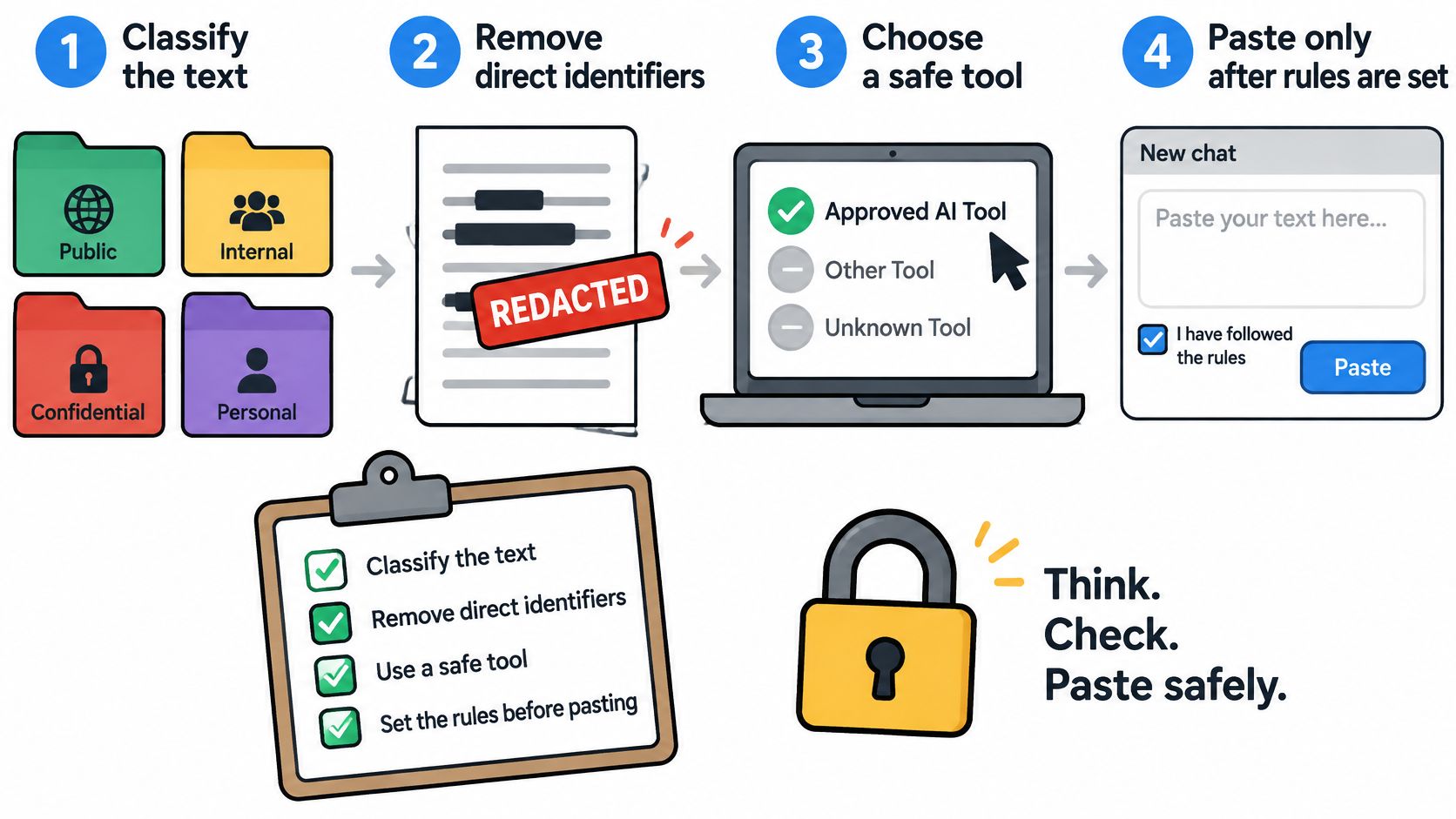
The infographic above covers the input side, and the table covers what survives afterwards.
Two consequences follow. Character cleanup and normalization reach invisible formatting, but they don't reverse token-distribution signals created during generation. And a hidden character is not evidence of AI authorship, because the watermark mechanism and the invisible-character mechanism are technically distinct. Text can carry one, both or neither.
Simple Unmark's AI watermark remover works at the wording layer: it rewrites word choices to reduce statistical patterns, and it cannot measure how much of the provider's original signal remains. It doesn't guarantee removal, permanent undetectability or any particular detector score.
Take a 300-word draft with three zero-width spaces and the same opening clause in four paragraphs. Character cleanup removes the invisible marks, and editing handles the repeated clause. Neither step tells you what a vendor's detector will say.
Set Your Privacy Rules Before You Paste Anything
The decision belongs before the paste, not after it. Four categories cover almost every document: public, internal, confidential and personal. Public material can go anywhere. Internal material stays with tools your organisation has reviewed. Confidential and personal material only goes to a tool whose access path you can name, and only after direct identifiers come out.
The routine that follows takes about two minutes on a first pass.
- Classify the text using those four buckets.
- Strip direct identifiers, including names, account numbers, addresses and case references.
- Pick the processing mode that matches the classification, which on Simple Unmark is a choice made before every rewrite.
- Run the seven-step audit on whichever tool you're about to use.
- Record the tool and the date alongside the output, so a later review can trace which system processed what.
What a text-only tool can and cannot answer
Simple Unmark currently supports text only, so anything about images, audio or video sits outside its scope. The free invisible-character inspector runs locally in the browser with no signup and no upload, which lets anyone check for hidden characters before deciding whether the rest of the text should leave the machine at all.
Where the limits sit: results are an editing aid. No tool can promise that every watermark disappears, that meaning survives perfectly, or that a particular detector will return a particular verdict.
That's the honest trade. Cleaning text reduces one kind of trace while leaving the access question exactly where it was, which is why the parties in the pipeline matter more than any checkbox.
Simple Unmark handles the text side of this problem: it strips hidden Unicode characters, converts pasted text to clean plain text, and rewrites passages to reduce statistical watermark patterns while keeping facts, numbers and proper nouns intact. You choose a privacy mode before every rewrite, and the invisible-character inspector runs free in your browser without a signup or an upload. Visit Simple Unmark and clean the next passage you'd otherwise paste blindly.
- ai data privacy
- AI privacy risks
- AI text privacy
- data retention AI
- AI consent settings
Related articles
Simple Unmark Word Limits and Credit Examples
Guests get three cleans of up to 100 words; accounts support up to 5,000 words per clean. See word-block billing and privacy-mode multipliers.

Credit-Based Pricing for AI Text Tools
Understand usage credits, word blocks and privacy-mode multipliers, with worked examples of Simple Unmark's one-time credit pricing.
AI Blog Writer Guide: Edit Drafts Without Losing Facts
Learn how to use an AI blog writer well: prompt for sources, edit drafts, clean hidden characters and keep facts, numbers and your voice intact.